
Explanation
The Conclude platform
On this page
Conclude is a platform for organizing work across Slack and Microsoft Teams. It brings connected conversations, configurable workflow apps, and AI teammates into the tools people already use.
Think of the platform as three layers: Connect at the base joins conversations, Apps adds structure to the work, and Agents adds AI assistance at the top. The guide follows that order, starting with Connect.
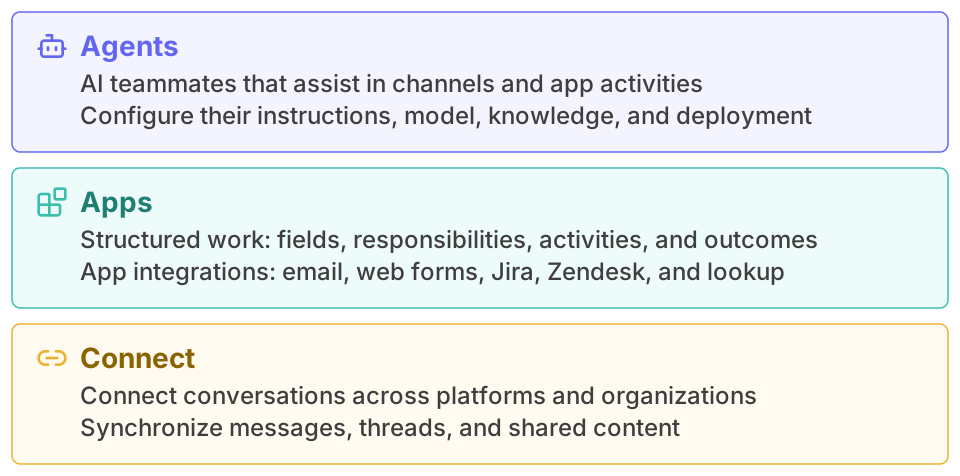
An admin turns each layer on under Admin console > Solutions , and each one is listed separately on the pricing page. You can use one layer on its own or combine them.
Connect
Connect links two channels or chats, usually one in Slack and one in Microsoft Teams. Messages, threads and files sync both ways, so each side stays in its own tool. There are three modes:
- Internal connects workspaces that your organization owns
- External connects one of your channels with a channel at another company. Each pair of channels needs its own invitation
- Bridge sets up a lasting link with another company. They accept one invitation, and then both sides can connect as many channels as they need
Read the Connect chapter.
Apps
Apps provide the layer for structured work. They let people manage tickets, tasks and workflows directly in Slack and Microsoft Teams. An app defines how one type of work is captured, assigned, discussed and concluded. Each item of work is a ticket. The same kind of app works for equipment requests, approvals, bug reports or incidents.
Anyone can build a Conclude app. You don’t need to write code. Start from a template and set it up in the app editor. Developers can go further with YAML, triggers, scripts and connectors.
With Connected Apps, a connected Slack channel and Teams channel share the same tickets. For example, an IT team in Teams can handle requests from colleagues in Slack.
Read more about Apps and Connected Apps.
Agents
An agent is an AI teammate. You choose a model from Anthropic or OpenAI and write the agent’s instructions. You can also give it knowledge, such as files and web pages. Conclude includes AI usage, or you can add your own provider key.
Then you add the agent to channels, apps or both. In a channel it answers when someone mentions it, or it reads every message and decides for itself when to answer. You can also switch it off.
Read the Agents chapter.
Where to start
For more in-depth technical information about Conclude, visit the technical reference.
Installing for the first time? Choose a setup guide. Working in an existing setup? See connected channels, chats, and the command reference.