
Explanation
The activity lifecycle
On this page
This page describes the states a ticket passes through, from app install to closing and reopening. It also says which trigger event fires at each step. Read it before you write automation or map statuses to Jira or Zendesk.
From install to closed
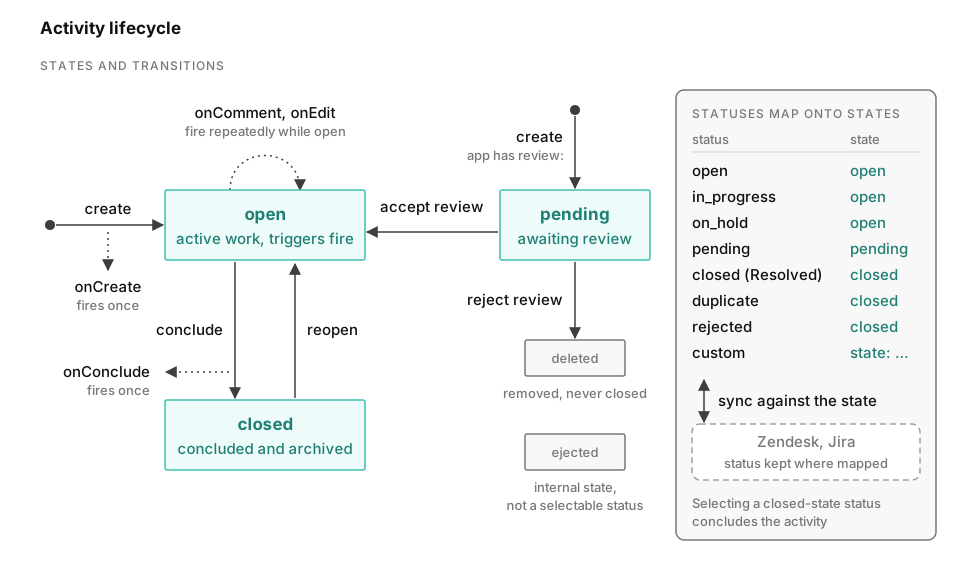
- Install. You install an app in a channel once. Conclude then replaces the install-time macros
${__installer},${__channel}and${__blank}with real users and channels. These macros can appear in the app’s roles, alert and review fields. - Create. A ticket starts from a reaction, a
/ccommand, Conclude Home, the Dashboard, a web form or an email. The ticket becomes open. Conclude invites its members, notifiessettings.alertand firesonCreate. - Pending. When the app has
review.members, a new ticket becomes pending instead of open. This happens for every initiator who is not excluded. See The review step. - Open. Members comment and edit.
onCommentfires on every comment or file.onEditfires on attribute changes. - Closed. Someone concludes the ticket. They can use the conclude dialog,
/c conclude, a trigger actionconclude: true, or a status option whose state isclosed. Conclude archives the ticket, fills an empty conclusion with the default, and firesonConcludeonce.
States and statuses
A ticket has a state and a status. The state is its position in the lifecycle. It is open, closed or pending. There is a fourth state, ejected. /c eject sets it when a ticket channel becomes a regular channel again. That state is internal, you can’t select it as a status, and you can’t undo it.
The status is the finer value that the app defines and the ticket shows, such as open, in_progress, on_hold, closed or duplicate. Every status maps to one state. Select a status that maps to closed, and the ticket is concluded. When the state changes and the current status no longer fits, the status resets to that state’s default. Statuses lists the built-in statuses and the state: binding for custom options. You edit the status attribute on the Attributes tab.
Jira and Zendesk sync against the state, not the status. They keep the status where a mapping exists. The mapping tables are in Statuses.
Which event fires when
| Transition | Event |
|---|---|
| Ticket created open | onCreate, once |
| Ticket created pending | None. review.alert is notified. |
| Pending accepted | None. settings.alert is notified. |
| Comment or file posted | onComment, every time |
| Attribute changed | onEdit, every time. A trigger with an attribute: fires only for that attribute. |
| Ticket concluded | onConclude, once |
| Ticket reopened | None. settings.alert is notified. |
There is no onReopen or onAccept event, and onCreate doesn’t fire when a ticket is accepted or reopened. An edit to owner or deadline is notified as an owner or deadline change, not as onEdit. Triggers lists the conditions and actions.
The review step
You configure the review step in YAML only, under the top-level review: key on the Expert tab. No editor tab has controls for it.
review:
  members: "@paul, @sarah"
  alert: "#incoming"
  include: external
While a ticket is pending, its only members are the reviewers, and review.alert is notified. ignore lists initiators whose tickets skip review, and Conclude checks it first. include lists initiators whose tickets are always reviewed. If you set include alone, everyone else skips review. The keyword external covers tickets created by web forms and email.
When a reviewer accepts, the ticket becomes open. The app’s normal member list replaces the reviewers, and the ticket’s channel is created. With createChannel: true, or when the app has an email connector, the channel is created while the ticket is still pending. Rejecting deletes the ticket. The YAML reference lists the fields.
Reopening
A closed ticket shows a Reopen button on its ticket message in Slack or Microsoft Teams. The same button says Re-open in the Slack Home tab and in the ticket’s menu in the Dashboard. A new email on a concluded email ticket reopens it automatically.
Reopening un-archives the ticket and sets the state back to open. It clears a conclusion that was filled in with the default. It also posts a reopen message and notifies settings.alert. No trigger fires.
Ticket commands lists the commands for concluding, ejecting and deleting a ticket.