
Explanation
Integrations
On this page
An integration attaches one outside system to one installed app. These pages are for the builder who has to choose one. There are three kinds of integration, and the kind decides which way the data moves.
Three kinds
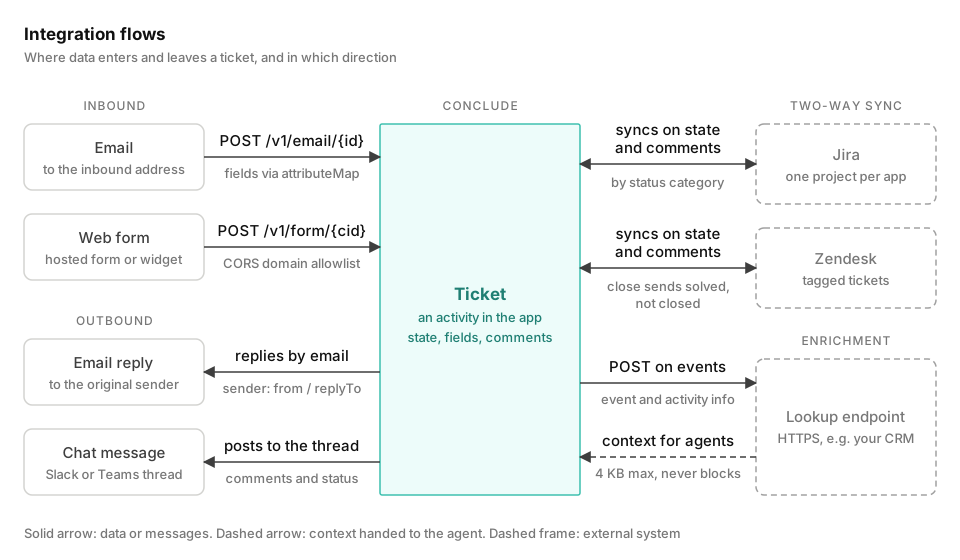
Intake creates tickets. Each form post and each new email thread becomes a ticket, and its fields fill the ticket’s attributes.
Email moves one way, with one exception. A reply from the ticket channel goes back to the sender. Nothing else about the ticket reaches the mailbox. A web form only sends data in. The page learns that Conclude accepted the post, and it gets an external ID that it can use to read the ticket back.
Sync keeps a ticket and an external record in step. Jira and Zendesk both carry comments, files and fields in both directions. Status crosses by a mapping, not by name.
Jira creates records in both directions. With Zendesk, tickets start in the app, and Conclude does not import a ticket that was opened in Zendesk.
Jira matches status by category. Any Done status closes the ticket, and the other categories keep it open. Zendesk follows a status table, and an option’s external: value overrides that table. Concluding a ticket sends solved rather than the terminal closed, so the customer can still reopen it. When solved or closed arrives from Zendesk, Conclude concludes the ticket.
Enrichment gives an agent context. On the events you list, Conclude posts the event, the ticket title and the initiator’s email to your HTTPS endpoint. It then places up to 4 KB of the response in the agent’s prompt. Enrichment runs only when an agent answers, and it writes nothing back. A timeout or an error never blocks the reply.
What they share
You switch email, Jira and Zendesk on for each installed app on the Integrations tab. Web forms and lookup endpoints exist in YAML only, on the Expert tab.
Credentials never appear in YAML. Jira and Zendesk accounts live in the Admin console, and a lookup token is a named Secret. Email, web form and Zendesk share one attributeMap shape with external and internal entries. See Connectors.
Two public endpoints and one legacy alias feed integrations:
POST /v1/form/<cid>creates a ticketPOST /v1/email/<id>receives inbound mail
The API doesn’t cover activities yet. Sync is the only two-way access to them.
Pages in this chapter
- Email covers the app’s address, attribute mapping, replies, and the optional preprocessing and summary steps
- Web forms covers the endpoint, the domain allowlist, reCAPTCHA, rate limiting, logging and the response
- Jira links one app to one Jira Cloud project. It covers what maps each way, pinned-only comment sync and status by category
- Zendesk covers what a new ticket creates in Zendesk, the tag, triage, custom-field mapping, and
solvedversusclosed - Lookup endpoints covers the request, how the response enters the prompt, and the URL, timeout and size limits
For what an agent does with enrichment, see Agents.