
How to
Expert
On this page
A builder never needs this tab. The other tabs write to the same YAML. Open this tab when a setting has no visual control, or to paste in YAML you wrote elsewhere.
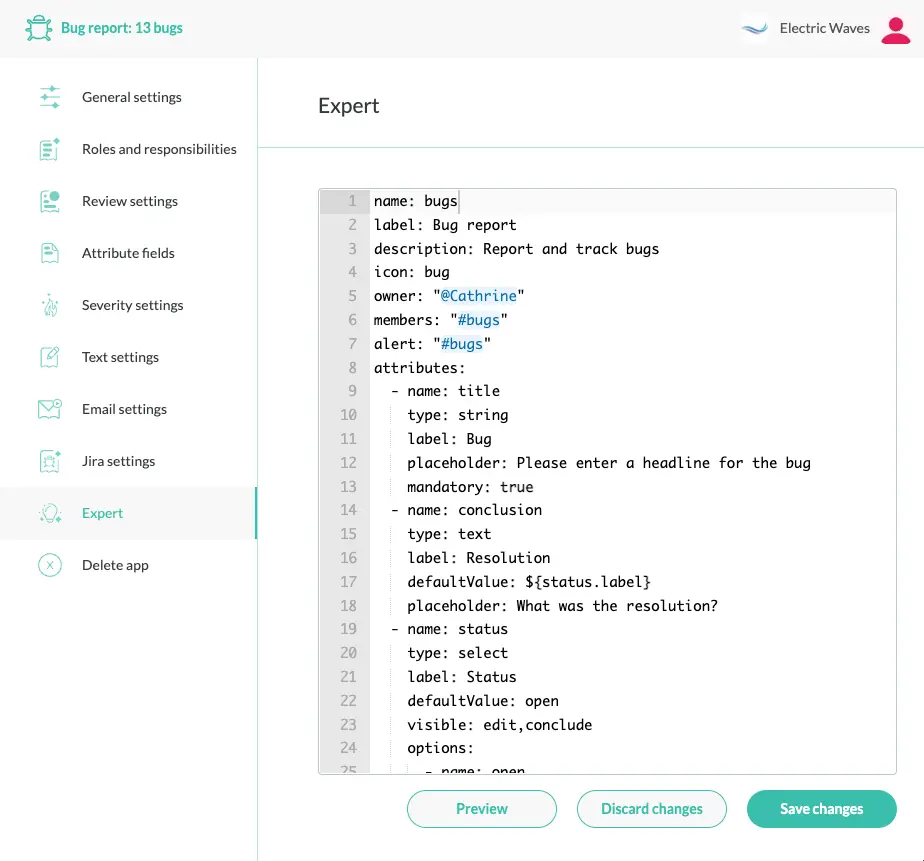
The YAML editor
The tab is a single code editor that holds the complete app YAML. It has YAML syntax highlighting and line numbers. There is no export control. To take a copy, select the text and copy it. Save with Save or Ctrl+S (Cmd+S on macOS).
Two aids are built in.
- In role and alert fields such as
members,admins,superusers,alertandto, typing@lists users and user groups. Typing#lists channels. Theownerfield lists users only - The editor quotes values in those fields for you, and any value that starts with
@. The quotes stop YAML from misreading them
As soon as the document parses, the other tabs show what you typed. Editing a visual tab regenerates the YAML shown here.
Validation and errors
The editor validates the document on every change, before anything reaches the server. It reports these errors:
- a YAML syntax error
- a missing
name,labelorattributessection - a missing
titleattribute - a duplicate attribute name
- an attribute without a
label, or with an unknowntype - a malformed role or
modevalue
An error appears as a marker in the line gutter next to the offending line. Hover over the marker to read the message. A message reads like There is an error in the document at line 12, column 3 or Missing mandatory attribute *title*.
While the document has an error, Save is disabled and Ctrl+S does nothing. The server checks the app again on save. See Validation rules.
Comments and formatting
Comments, blank lines and key order between top-level sections survive a save from any tab. Comments and blank lines inside a section are dropped, for example between attributes. Editing a visual tab regenerates the YAML shown here without comments. On save, the server merges the new state into the last saved document.
When you need this tab
Some sections have no visual control. You can only edit them here.
triggersandscripts. The one exception is a trigger’sagentandmodefields, which the Agents tab sets. See Triggers and Scripting. Scripts run only when scripting is switched on for the organizationlookup, the lookup endpoint. See Lookup endpointsreview, the review step. See Reviewadminsandsuperusersunderroles. The Roles tab does not expose them. See Macros and roles
The YAML reference has every key. For the other tabs, see the editor.