
Explanation
Automation
On this page
An app can act on its own in three ways: with triggers, with scripts and with agents. Most apps only need triggers. This page is for builders who have a working app and now want it to react to what happens on a ticket.
Three ways to automate
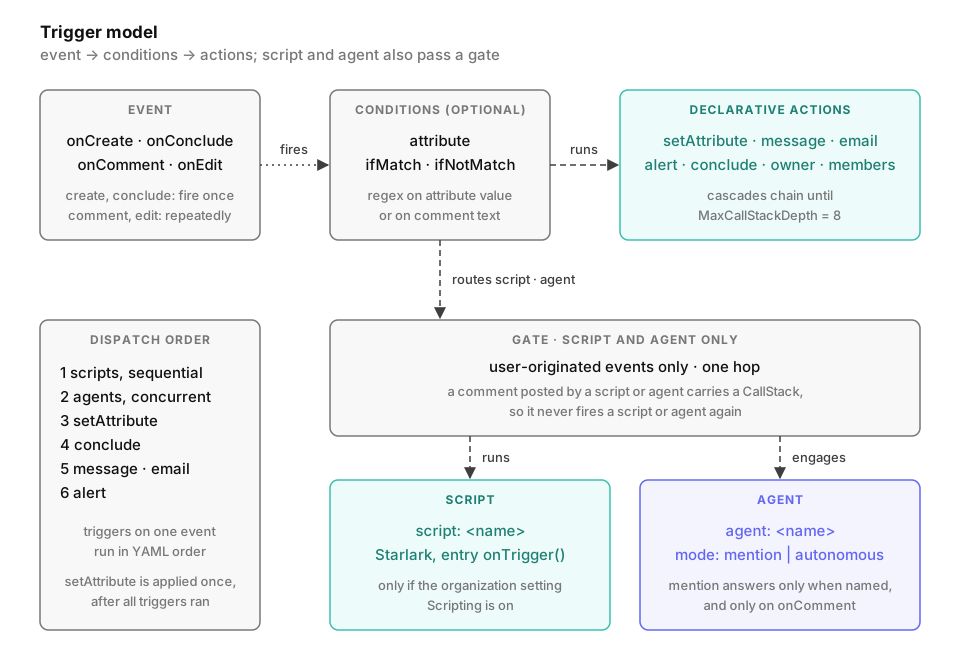
All three start from the same events: onCreate, onComment, onEdit and onConclude. onCreate and onConclude fire once per ticket. onComment and onEdit fire on every comment or attribute change. See the lifecycle.
| Style | What decides the outcome | Use it when |
|---|---|---|
| Trigger | Fixed actions written in YAML | The rule is always the same, such as notify, set a field or conclude |
| Script | Starlark code you write | The rule has branches or timing that YAML cannot express |
| Agent | A language model reading the ticket | The response needs judgment or free text |
An app can use any of them, or none. The triggers reference lists the actions and the dispatch order.
Triggers
A trigger names an event, optional conditions and one or more actions. They all sit on the same YAML object.
triggers:
  - onEdit:
      - attribute: severity
        ifMatch: critical
        alert: "#oncall"
  - onConclude:
      - email:
          to: ${initiator}
          subject: "Resolved: ${title}"
          body: ${conclusion}
A trigger can also sit on an attribute, or on one option of a select attribute. That is how a button or a status change acts. See per-attribute triggers. The Attributes tab has no control for these triggers. You edit them, and the top-level list, as YAML on the Expert tab. Triggers on the same event run in the order they appear in the YAML.
Scripts
A script is Starlark code under scripts:. A trigger’s script: action starts it. Its entry function onTrigger receives the ticket, a conclude object for side effects, and why it ran.
scripts:
  - name: route
    source: |
      def onTrigger(activity, conclude, trigger):
          category = activity.get("category")
          if category == "billing":
              activity.set("routed_to", "finance-team")
          elif category == "outage":
              activity.set("severity", "high")
              conclude.comment("Routed to oncall.")

triggers:
  - onCreate:
      - script: route
A script can read and set attributes, post and edit its own comments, and schedule itself to run again. The scripting reference lists the caps.
Agents
An agent belongs to the organization, not to the app. The app names the agent in a trigger. The Agents tab writes the same entries.
triggers:
  - onCreate:
      - agent: triage
  - onComment:
      - agent: triage
The app sets no mode. The agent answers in the mode it has in the app’s channel. That mode only affects onComment, because only a comment can address the agent. On the other events, the agent answers unless it is off. See Modes and what the agent sees.
Conditions
Three keys hold a trigger back, whatever its action:
| Key | Effect |
|---|---|
attribute | Limits an onEdit trigger to this attribute. Without it, the trigger fires on every edit. |
ifMatch | A regular expression the new value must match. On onComment, it matches the comment text. |
ifNotMatch | A regular expression the value must not match. With ifMatch, both must hold. |
The full table is in the conditions reference.
Loop protection
Scripts and agents only fire on events that no trigger caused. Anything a trigger changes carries a call-stack marker. The follow-up events it raises don’t dispatch scripts or agents. A script that posts a comment therefore doesn’t start itself again.
An agent never answers its own comments. Its comments on one ticket are also rate-limited and capped. Declarative actions such as setAttribute, message and email can still chain, but the cascade stops at a fixed depth.
A script that schedules itself again with conclude.schedule gets past this guard. Only the length of its chain limits it. The numbers are in the triggers, scripting and agents references.
Related pages
- The activity lifecycle shows when each event fires
- Example apps has worked examples
- The YAML reference lists every key an app accepts