
Explanation
Learning
On this page
With learning enabled, Conclude summarizes a channel’s closed tickets and conversations. You review the summaries, and agents can search the approved ones when answering in that channel.
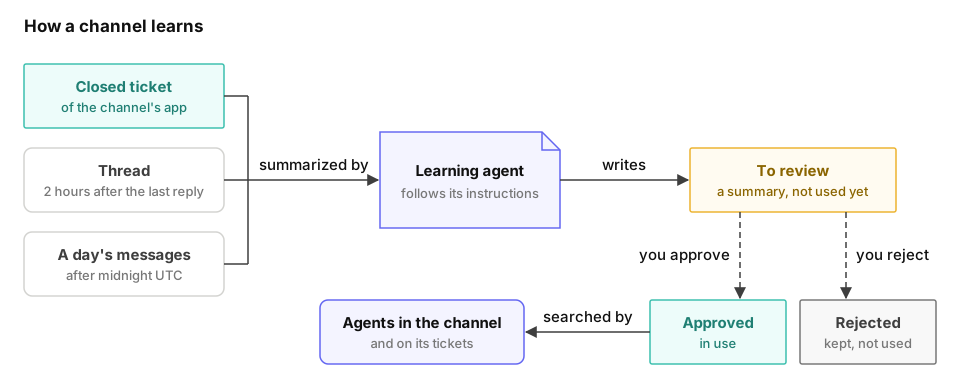
What a channel learns from
| Source | Summary | Written |
|---|---|---|
| A closed ticket of the channel’s app | A case file with the problem, the cause, the resolution and the key steps | When the ticket is closed |
| A thread in the channel | A case file with the question, the answer and the details | Two hours after the last reply |
| The day’s messages in the channel | A digest with topics, decisions and open questions | After the day has ended, in UTC |
Every summary ends with keywords and a link to the ticket, thread or day it came from.
Conclude skips these sources:
- a private ticket
- a thread with only one person in it
- a day with fewer than three messages
- content the learning agent identifies as trivial, such as small talk or test messages
When a new ticket closely matches an earlier case file, Conclude records it as another occurrence in that case file.
Only a channel with an app can learn. Learning covers the tickets closed and the messages written after you switch it on. A connected channel learns from its tickets only.
Switch learning on
You need the Manage agents permission and the Manage apps permission.
- Open Admin console > Conclude Agents > Deployment and select the channel’s row. If the channel isn’t listed, open the app in the app editor and go to its Agents tab.
- Tick Learn from this channel.
- Choose the learning agent. Pick one that your organization already has, or create a new one.
- For a new one, pick a Type of learning and select Generate. Custom generates an agent based on the channel’s app. Support, Incident and Approval use fixed sections for that kind of work.
- Review the generated agent, and select Create.
- Select Save in the drawer.
When your organization has no learning agent yet, the dialog also offers Use the default learning agent. It skips steps 4 and 5.
To switch learning off, clear Learn from this channel and select Save. Existing summaries are kept.
The learning agent
A learning agent writes the summaries. It is one of the agents for special tasks. It does not reply in channels or count toward your plan’s agent limit.
You edit a learning agent like any other agent. Its instructions define the sections in each ticket’s case file. The model determines the cost of generating summaries, and the API key determines how usage is billed. One learning agent can serve several channels, and a channel has one learning agent.
The instructions start with rules that keep personal data out of the summaries. The learning agent refers to people by their role, and it leaves out email addresses, phone numbers and similar identifiers. Keep these rules when you change the instructions.
Review comes first
A new summary waits under To review on the Learning page. Agents use only the summaries you approve. See Review what channels learn.
How agents use learning summaries
Every agent that answers in the channel, or on the tickets of its app, can search the channel’s approved summaries. No additional configuration is needed. When a summary matches, the agent uses it and includes its link.
Agents don’t search the summaries on a connected ticket, on a private ticket or in a connected channel.
What Conclude stores
Conclude stores message text for seven days in channels with conversation learning enabled. In channels with an agent but no learning, it stores message text for one hour. When you switch learning off, Conclude removes the messages it kept for learning.
The summaries are stored in a collection that belongs to the channel. See Learning collections.