
Explanation
Conclude Agents
On this page
An agent is a configured model that takes part in channel conversations and ticket threads as a teammate. For the setup steps, see the Agents quickstart. For the YAML that names an agent in an app, see Agents in YAML.
Four parts
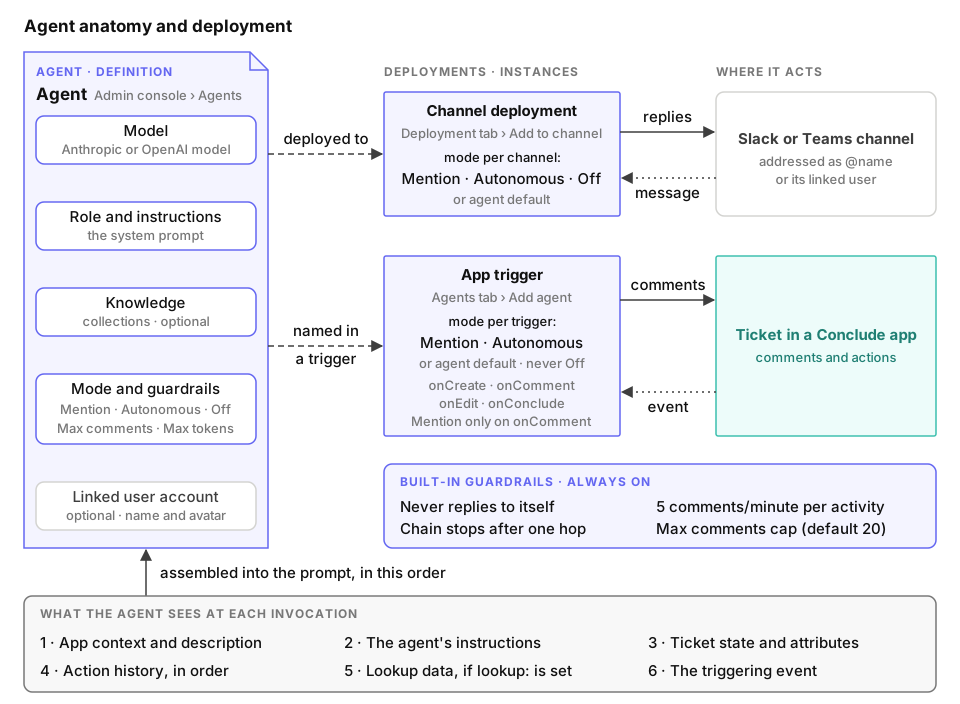
Every agent has the same four parts, set in Admin console > Agents > All agents :
- Model. The provider and model that generate the agent’s replies. You choose Anthropic or OpenAI. The agent runs on Conclude’s included usage, or on a provider key you add under All agents
- Role and instructions. The role is a one-line description shown in the agent list. The instructions are the system prompt. They say what the agent does, when it speaks, what tone it uses and where its boundaries are
- Knowledge. Optional collections of uploaded files and URLs. The agent answers from them and cites them
- Deployment. The channels where the agent takes part, and the apps whose tickets it answers. An app doesn’t own an agent. It names one in a trigger, and one agent can serve several apps and channels
Identity
Every agent has a dedicated user, so its comments carry its own name and avatar. You can also link the agent to a dedicated user account. It then posts as that account, is listed as a member, appears in @ autocomplete and joins every channel the account belongs to. Without a linked account, people reach the agent in a channel by writing @ and its name. Only link an account created for the agent, because that account signs everything the agent writes.
Modes
The mode decides when the agent speaks. An agent has one mode in each channel, and it covers the channel’s conversation and the tickets of the channel’s app.
- Mention. The agent responds when someone @mentions it. In a channel, that means
@nameor a platform mention of its linked account - Conversational. The agent also responds when someone writes its name
- Autonomous. The agent reads every message and comment, and speaks up when it decides a reply is relevant
- Off. The agent stays deployed but never responds, not even on the app’s tickets
Each agent has its own mode, set on its General tab. It is Mention when you set none. A channel can override it on the agent’s Deployment tab, or on the app editor’s Agents tab for the app’s channel. Default follows the agent’s own mode. Off exists because a linked account follows its account’s membership, and in a public Microsoft Teams team every member is in every public channel. An agent switched off keeps its deployment. When you switch it back on, it reads what it missed.
Only a comment can address an agent, so the mode only decides which comments it answers. The agent answers the other events its triggers name, such as a new ticket, unless it is off. An app sets no mode. Conclude ignores a mode: or onMention: line that an older app still has. An agent marked internal-only stays out of conversations that people outside the organization can read, whatever its mode.
Learning
A channel with an app can learn from its closed tickets, its threads and its daily messages. Conclude sums each one up as an entry. You review the entries in Admin console > Agents > Learning and add the useful ones to knowledge. From then on, the agents answer from them on the app’s tickets and in the channel. You switch learning on for a channel in Admin console > Agents > Deployment . Both pages are in beta. See Learning for what each source becomes and when.
What the agent sees
When a ticket invokes the agent, the system prompt holds these parts, in order:
- The app’s
context, or its description when there is nocontext. - The agent’s instructions.
- The current ticket state: title, body, status, severity, owner, creation date, members, deadline, conclusion and every custom attribute that has a value.
- Any lookup data.
- The event that fired the agent.
- The agent’s knowledge base.
The ticket’s action history follows as a conversation. Comments become turns. Changes to status, owner, members and attributes become [system] lines. Only this agent’s earlier comments read as its own turns. In a channel, the agent reads the conversation from the platform instead.
If the app has a lookup: endpoint, Conclude POSTs to it on the events you list. It sends the event, the ticket’s title and the initiator’s email address. It then adds the response body to the prompt as customer context. See Lookup.
Guardrails
Four rules limit what an agent posts on one activity:
- No reply to itself. An agent never answers its own comments
- One hop. A comment posted by a script or an agent carries a call stack, and a non-empty call stack blocks further dispatch. An agent answers a person, never another agent
- Rate limit. An activity allows five agent comments per minute. Conclude drops events over the limit instead of queueing them
- Comment cap. The agent’s Max comments setting stops it once a ticket holds that many agent comments, counting the comments from every agent. The default is 20. Max tokens limits the length of each reply, and it is 1024 tokens when you leave it empty
Next
- The Agents quickstart covers provider keys, knowledge collections, and how to create and deploy an agent
- The Agents tab sets which agents an app uses, and on which events
- Automation covers agent triggers beside scripts and notifications
- Agents in YAML covers wiring agents to triggers, the mode and loop protection