DevOps Ticketing Systems: Stop Losing Work in Slack
 Conclude Team
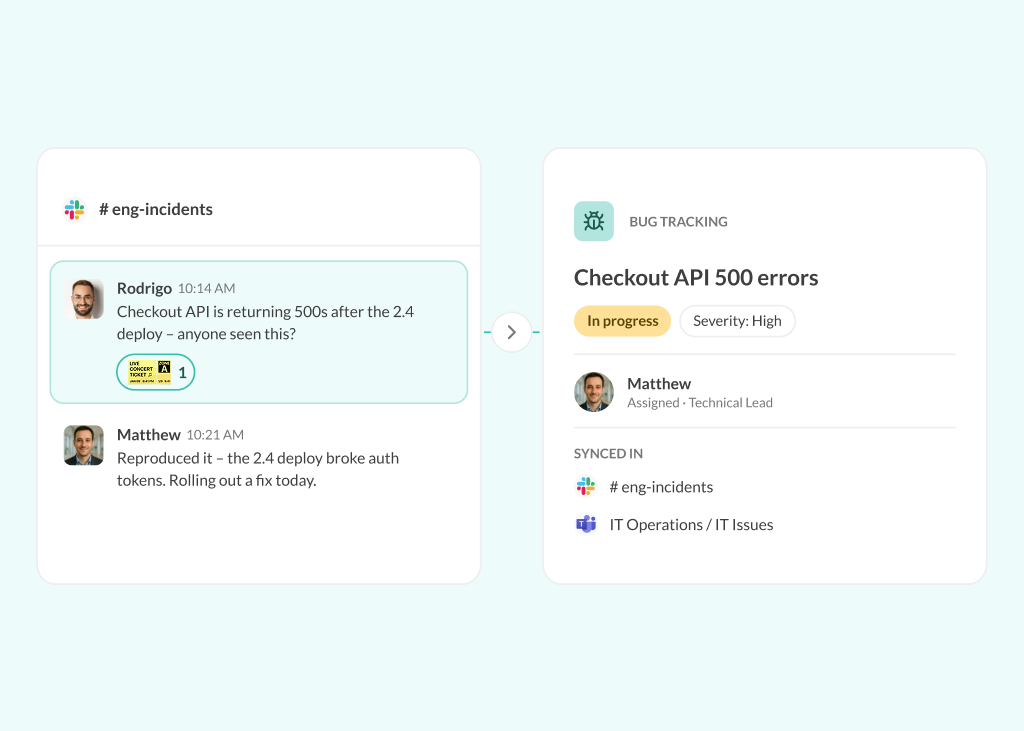
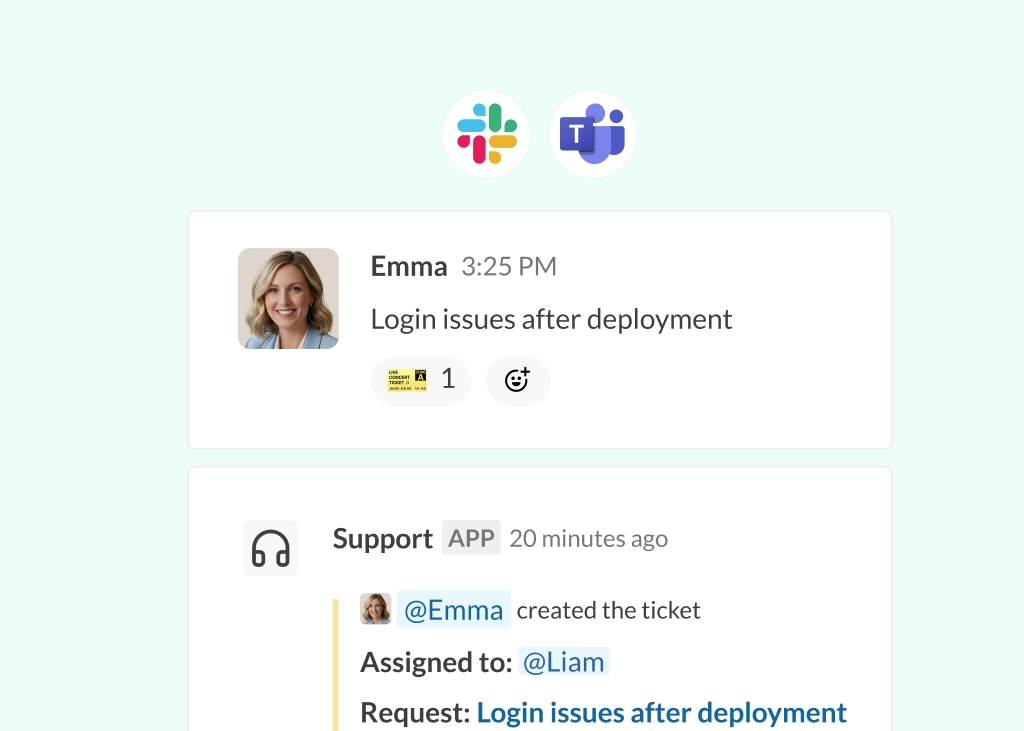
DevOps ticketing systems are built to track work, but most engineering work doesn’t start there. It starts in Slack or Microsoft Teams.
Bugs, incidents, release requests, and blockers are usually raised in chats. A message gets posted, a few people respond, and a quick decision is made. Then the team moves on. The problem is what happens after that. Too often, nothing gets formally tracked: the issue is buried in a thread, the ticket never gets created, and there is no clear record of what was agreed.
This is a common gap in engineering workflows. In GitLab’s 2024 Global DevSecOps Report, 54% of individual contributors said their teams use 6–14 tools for software development. When work starts in Slack but needs to be tracked elsewhere, that gap creates friction.
Engineering and DevOps teams need both sides of the workflow to work together; they need the speed and flexibility of Slack or Teams, where issues are raised and discussed in real time. But they also need a system of record where work is clearly owned, tracked, and resolved.
When those two systems are not connected, things get lost in Slack.
In this article, we’ll look at why engineering work naturally starts in chat, why it often falls through the cracks, and what effective ticketing for engineering teams should look like. We’ll also explore how teams can create tickets directly from Slack and Teams messages and how Conclude Apps help connect conversations with structured, trackable work.
Why DevOps Teams Struggle With Ticket Tracking
Engineering and DevOps teams don’t struggle with ticketing because they lack tools. Most teams already use systems like Jira, Azure DevOps, or ServiceDesk to manage bugs, incidents, and operational work. The challenge is that these systems sit outside the day-to-day flow of engineering work.
Work is raised while teams are actively collaborating: a bug is reported in a channel, a blocker comes up during a standup thread, or an incident is handled in a dedicated incident channel. Release discussions and feature requests follow the same pattern.
Capturing that work requires someone to recreate it elsewhere. That involves opening a separate tool, summarizing what was discussed, assigning ownership, and adding structure for tracking. Even when teams intend to do it, the extra step interrupts the flow of work.
Smaller or less urgent items tend to be the first to slip; a bug might be acknowledged but never tracked, and a discussion can end with missing action items. The underlying issue is not the ticketing system itself, but the separation between discussion and documentation.
Common Ways Engineering Work Falls Through the Cracks
Even when teams have clear processes, gaps still appear in day-to-day work:
Bugs That Never Become Tickets
A bug gets reported in Slack, a few engineers take a look, confirm it’s an issue, and agree it should be fixed. The discussion moves forward, but no one creates a ticket because ownership is unclear.
One person might assume someone else will handle it, while others expect it to be picked up later. Without a ticket, the issue has no visibility outside that conversation and no place in the team’s workflow – until it resurfaces later as another report or part of a larger issue.
Sprint Blockers Hidden in Conversations
Blockers are often raised during standups or sprint discussions in Slack; they’re acknowledged quickly, sometimes with suggested next steps, but they don’t always make it into the backlog.
Without being formally tracked, these blockers are easy to lose alongside other ongoing conversations. Dependencies aren’t clearly documented, and timelines begin to slip with no record of when the blocker was raised or who owned it.
Incidents Without a Clear Record
During incidents, teams often rely on a dedicated incident channel in Slack to coordinate a response. Information is shared quickly, decisions are made in real time, and the issue is eventually resolved.
Once the incident is over, the channel becomes a record of what happened, but not a structured one. There is no formal incident log, no consistent summary, and no clear documentation of the resolution.
Weeks later, when teams need to revisit the incident, they have to reconstruct what happened, why it happened, and how it was resolved from messages spread across threads.
Alerts That Never Become Incident Reports
Monitoring tools generate alerts continuously, and many of them are investigated directly in Slack. An alert is triggered, the team looks into it, shares logs or metrics, and resolves the issue within the same conversation.
Once the issue is fixed, the discussion stops there. No ticket is created, and no incident report is documented, so there is no long-term audit trail. When similar alerts recur, teams often repeat the same investigation instead of building on past work.
Decisions That Become Untraceable
Technical decisions are frequently made in Slack, especially in fast-moving environments. Deployment changes, architecture trade-offs, and bug prioritization are often discussed and agreed on in threads or channels.
These decisions move quickly from discussion to execution, but they are rarely documented in a structured way. The reasoning behind them stays within the conversation. Weeks later, it becomes unclear why a particular approach was chosen, who made the call, or what constraints influenced it.
Post-Mortems That Require Manual Reconstruction
When incidents are resolved in Slack, the conversation becomes the primary source of information. It contains timelines, decisions, and troubleshooting steps, but not in a format that is easy to reuse or analyze.
Creating a post-mortem requires going back through those messages, identifying key moments, and manually reconstructing the sequence of events. This process is time-consuming and often delayed, especially when teams are already moving on to new priorities.
Without a structured record, there is also limited visibility into whether follow-up actions were completed, and lessons learned can be lost over time.
What a Modern DevOps Ticketing System Should Look Like
A modern engineering ticketing setup should support the way teams already work, rather than forcing them to step outside their normal process. Work starts in conversations, so capturing that work should happen there as well.
In practice, this means enabling teams to raise issues where conversations already occur, create tickets directly from discussions, and preserve context without having to manually rewrite it. Teams should also be able to assign ownership as part of the conversation, maintain a clear system of record, and track progress through to resolution.
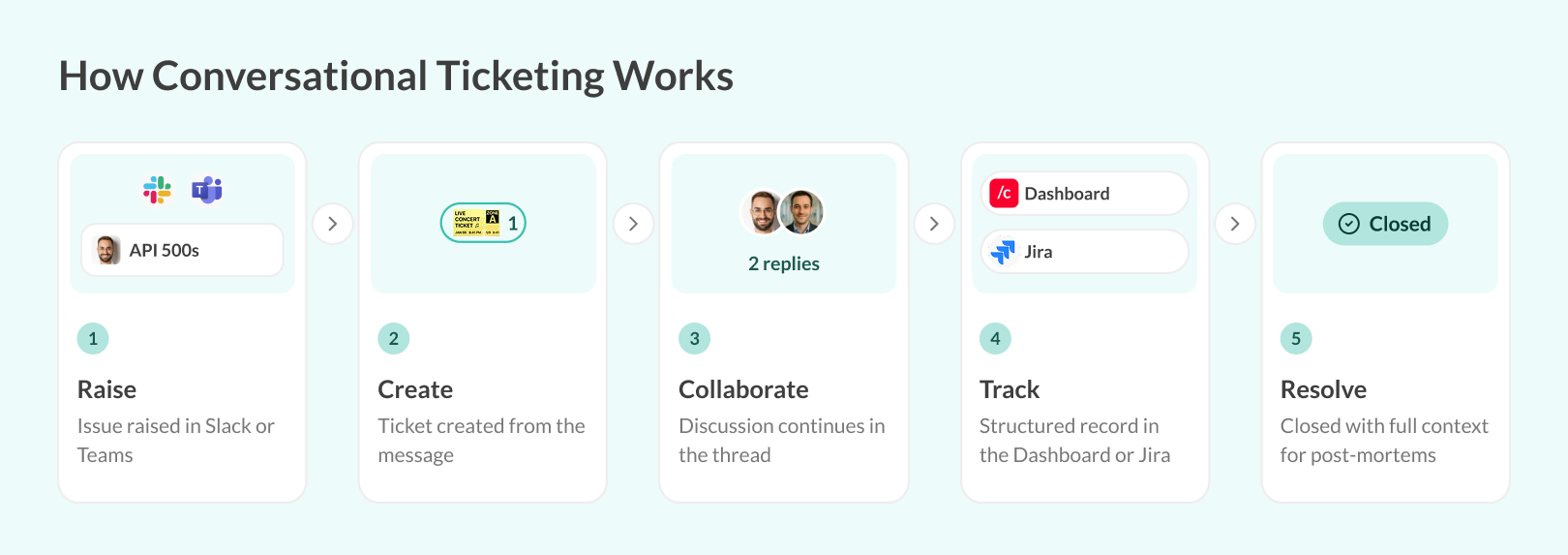
A typical workflow looks like this:
- An issue is raised in a Slack or Teams conversation
- A ticket is created directly from that message, without leaving the thread
- The discussion continues in the same context, either within the thread or in a dedicated channel
- The ticket exists as a structured record in the background – in the Conclude Dashboard or synced to Jira – where it can be tracked, assigned, and resolved
- When the work is complete, the outcome is visible, and any follow-up actions or post-mortems are tied back to the original context
This approach is often referred to as conversational ticketing. You can explore this in more detail in our conversational ticketing guide.
The goal is not to replace systems like Jira, Azure DevOps, or PagerDuty; those tools remain the source of truth for tracking and reporting. The focus is on reducing friction between conversations and those systems, so that capturing work becomes part of the workflow rather than an extra step.
New: Incident Alerts Now Synced Across Slack and Teams
Many DevOps teams rely on incident management and alerting tools that post automated updates into chat. Some platforms, such as BigPanda, create a dedicated Microsoft Teams channel for each major incident and post updates as adaptive cards.
With Conclude Connect, these bot messages and adaptive cards sync from Teams to connected Slack channels (including updates to existing cards). The same applies to bot messages from tools such as Power Automate and other alerting tools.
To turn this feature on, open the Connection settings for a channel and select Sync Teams bot messages on the System and bot messages tab.
Benefits of Creating Tickets Directly From Conversations
When creating tickets takes extra effort, teams are less likely to do it consistently. Creating tickets directly from conversations removes that step, so teams can turn discussions into trackable work as they happen:
- Less context switching – engineers can create and manage tickets where discussions are already happening, keeping logs, links, and decisions attached instead of recreating them in another tool
- Faster triage and response – teams often work under time pressure during incidents and production issues. Issues can be captured the moment they are raised, while context is still fresh, making it easier to assign ownership and begin an investigation
- Better traceability – teams can see what happened, who owns a task, what decisions were made, and how issues were resolved, with discussion linked directly to execution
- Improved visibility – teams can see ownership, status, and outcomes in one place, instead of searching chat history or switching between tools
- More effective post-mortems – when discussions and actions are already tied to a ticket, teams don’t need to manually reconstruct what happened
Common Engineering Ticketing Use Cases
These are some of the most common engineering use cases where creating tickets directly from discussions makes a measurable difference:
Bug Tracking
Bugs are often first identified during conversations in Slack, whether through internal testing, customer reports, or ongoing discussions between engineers. Capturing those issues directly from the conversation makes it easier to turn them into trackable work without losing context. See How to Create a Jira Ticket From Slack for a step-by-step guide.
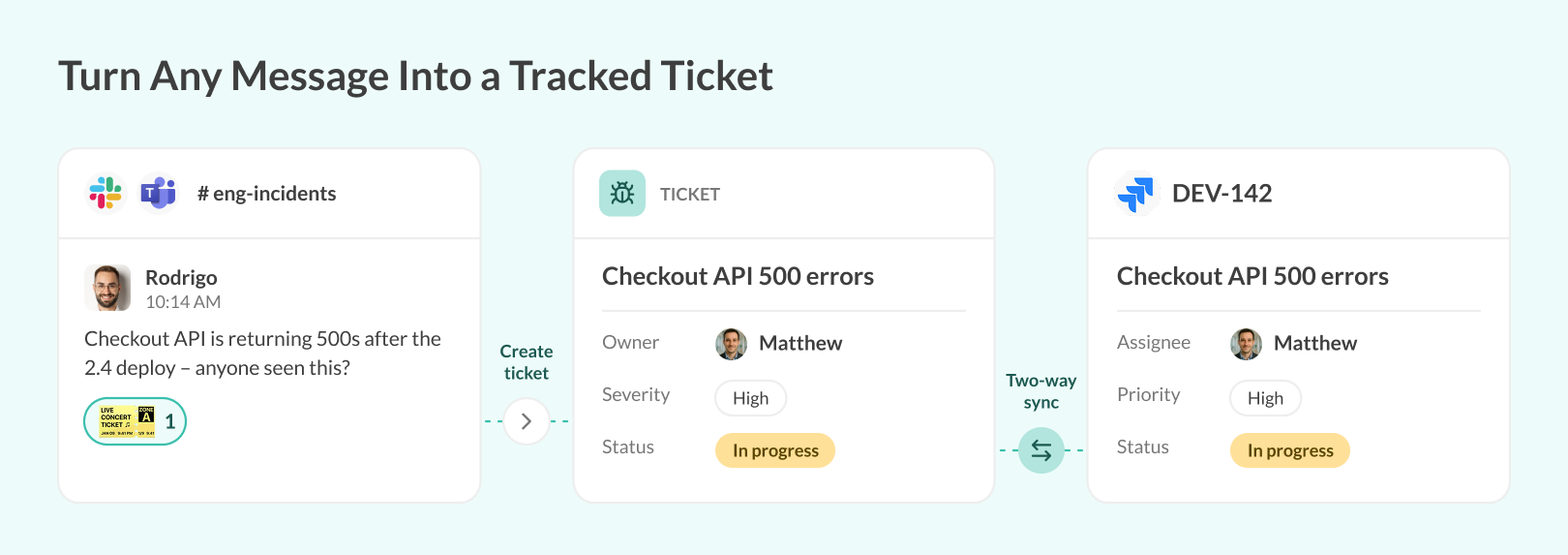
Once a ticket is created, teams can maintain visibility from initial report to resolution, reducing the risk of bugs being forgotten.
Incident Response
During incidents, teams rely heavily on real-time communication to coordinate response. Creating tickets alongside those conversations allows teams to track the incident while preserving the full discussion history. This improves accountability during active incidents and creates a structured record for post-mortems.
Alpha Testing and User Feedback
Feedback from testers or early users often comes through informal channels, including Slack messages or shared threads. Turning that feedback into structured work items helps teams track and prioritize it.
Without a clear way to capture this input, valuable insights can remain scattered across conversations and never make it into the product development process.
Release Requests and Deployment Coordination
Release processes often involve multiple steps and stakeholders, including deployment requests, approvals, launch blockers, and rollout coordination. These discussions frequently take place across different channels and threads.
Linking those conversations to structured tickets helps keep communication and execution aligned, without relying on fragmented discussions or manual follow-ups.
How Conclude Supports Engineering and DevOps Workflows
Conclude Apps supports the way engineering teams already work by bringing ticketing into the same place where issues are raised and discussed – in Slack or Microsoft Teams.
Instead of relying on a separate step to document work, teams can create tickets directly from Slack conversations – or from Microsoft Teams. This allows bugs, incidents, and requests to be captured at the moment they are identified, without interrupting the flow of work.
- Teams can use pre-built apps for common engineering use cases such as bug tracking, incident management, or internal requests
- These apps provide a structured way to capture and track work, while still keeping everything connected to the original conversation
- For teams with more specific requirements, workflows can be customized to match existing processes, rather than forcing teams to adapt to a fixed system
Conclude integrates with Jira, which remains the system of record for many engineering and DevOps teams. The integration supports bi-directional synchronization, so updates made in Slack or Teams reflect in Jira, and changes in Jira are visible back in the chat. This keeps both systems aligned without requiring manual updates or duplicate effort.
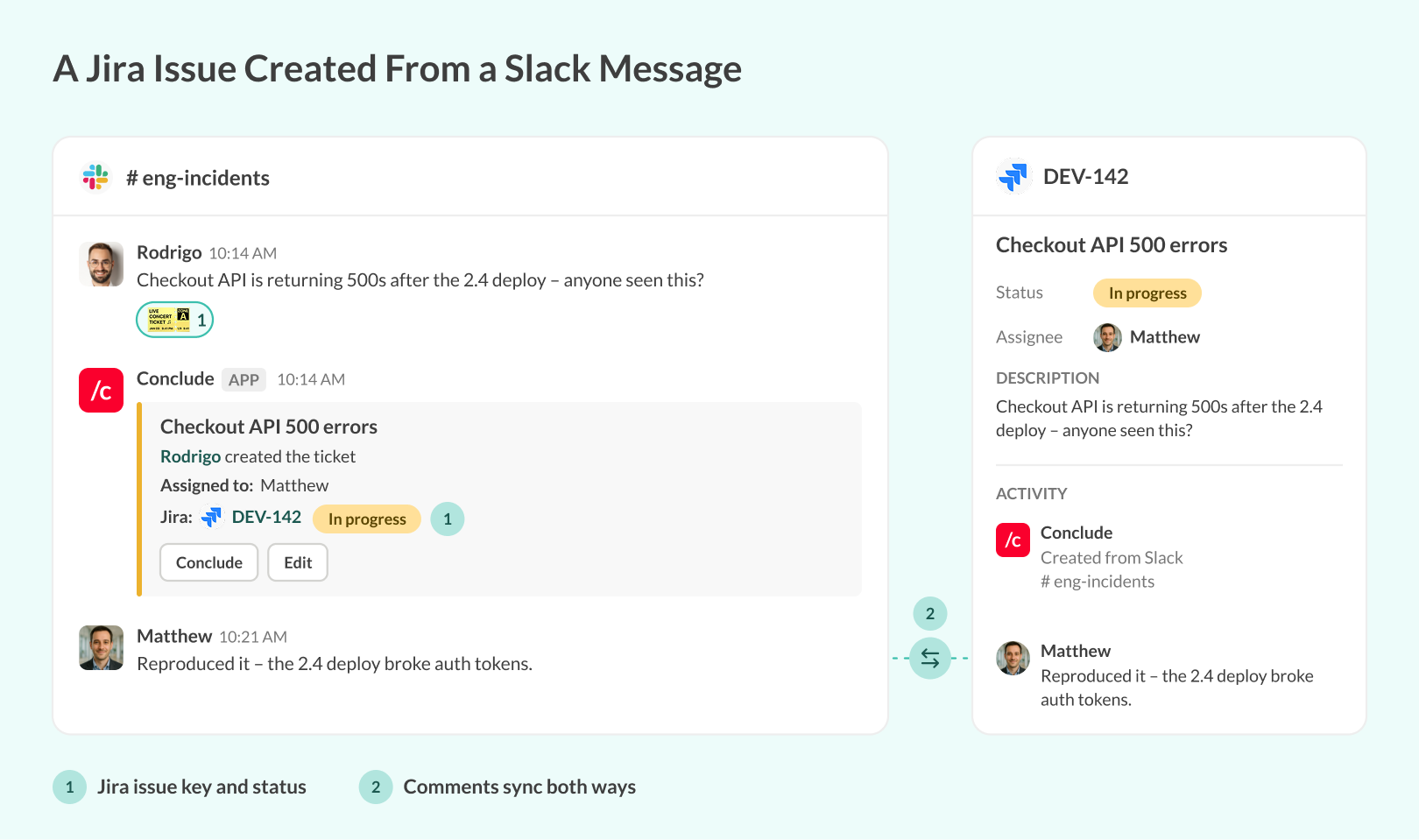
Cross-Platform Ticketing on Slack and Teams
For teams split across platforms – for example, engineering on Slack and IT or operations on Microsoft Teams – cross-platform ticketing (Connect and Apps together) links Slack and Teams channels and syncs tickets across both, including Jira issues. Read this blog for more about how Connected Apps works.
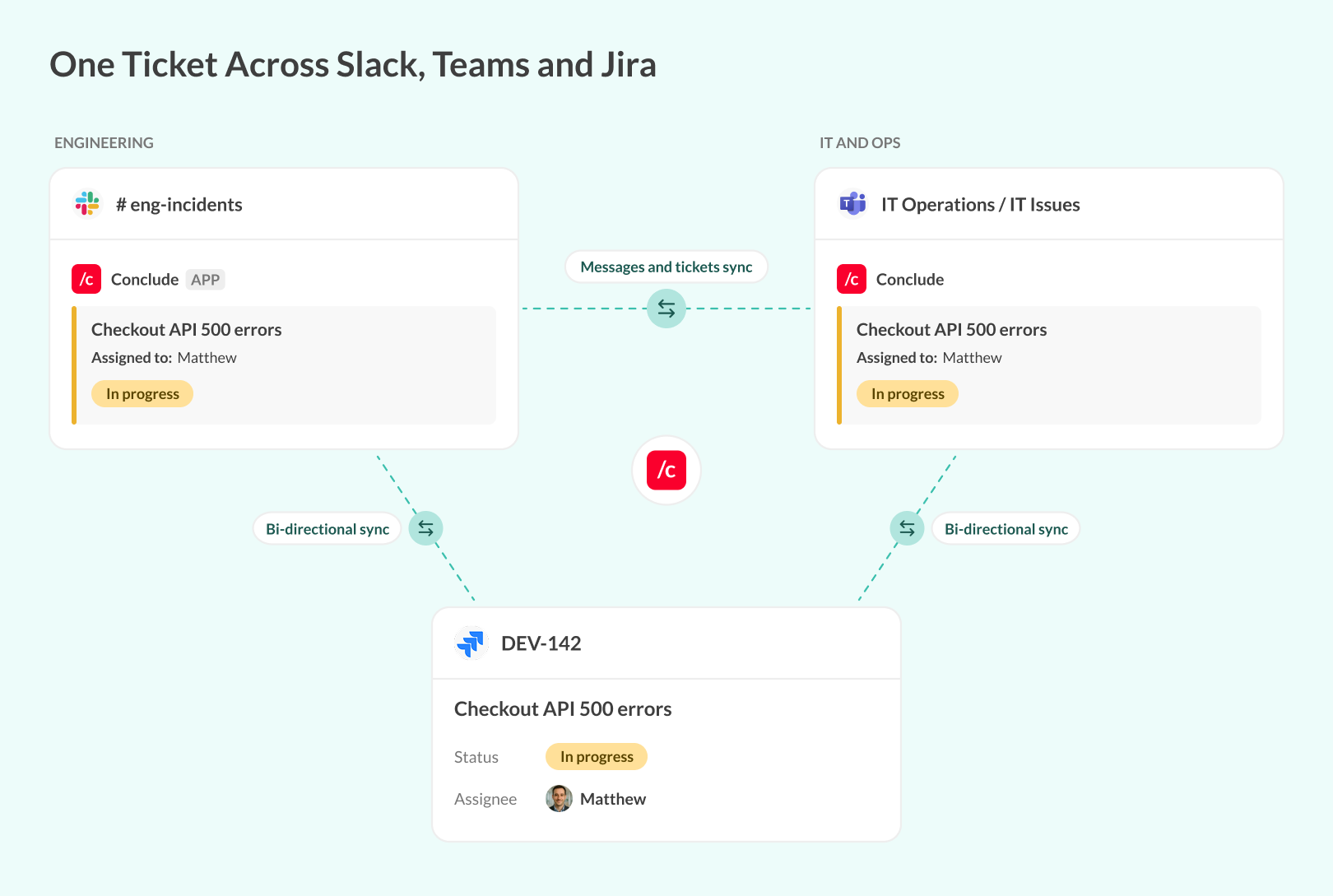
Alongside this, the Conclude Dashboard provides a centralized view of all open and closed tickets; teams can track ownership, monitor status and progress, and review historical issues in one place.
For customer-reported issues, the Zendesk integration syncs support tickets with Slack and Teams. Learn more about how to connect Slack and Jira for issue management, or see our Jira and Microsoft Teams integration guide.
AI and Conclude Agents in Slack and Teams
Conclude Agents are AI teammates trained on your internal knowledge. They can answer questions and step in on Slack or Teams channels to help resolve tickets, and Conclude is developing Agents to take on more of the ticketing workflow.
Conclude Apps also include AI features that generate clear ticket descriptions and translate messages across 60 languages. With the email integration, any installed Conclude app can summarize incoming emails and turn them into tickets.
Connecting Conversations to Engineering Work
Engineering work doesn’t start in a ticketing system; it starts in conversations. At the same time, accountability depends on a clear system of record that tracks, assigns, and resolves work.
A modern DevOps ticketing system connects these two parts of the workflow. The goal isn’t to replace existing systems, but to reduce the gap between discussion, action, tracking, and resolution, so teams can maintain visibility and a clear record of decisions and outcomes.
Conclude supports this approach by allowing teams to turn Slack and Teams conversations into structured, trackable work. Tickets can be created in the moment, synced with systems like Jira, and managed without leaving the flow of day-to-day collaboration.
Get started for free for 14 days and see how you can capture and track engineering work without losing context.
Frequently Asked Questions
Why do bugs and incidents get lost in Slack?
Bugs and incidents often get lost in Slack because they are discussed in real time, but not always formally captured. Conversations move quickly, multiple threads happen at once, and ownership is not always clear. Without a structured way to turn those discussions into tickets, issues can become buried in a thread, assumed to be handled by someone else, or never filed at all.
What is the best ticketing system for DevOps teams?
The best ticketing system for DevOps teams is one that fits into existing workflows rather than disrupting them. Most teams already rely on systems like Jira or Azure DevOps as their system of record, but the challenge is capturing work consistently.
An effective setup combines a structured ticketing system with the ability to create and manage tickets directly from conversations. This reduces friction, improves consistency, and ensures that issues raised during discussions are properly tracked and resolved.
Can you create tickets directly from Slack messages?
Yes, tickets can be created directly from Slack messages using integrations or conversational ticketing tools such as Conclude, which also works in Microsoft Teams and syncs tickets with Jira. This allows teams to capture work at the moment it is discussed, without switching tools or rewriting context.
What is conversational ticketing?
Conversational ticketing is an approach where tickets are created and managed directly from chat conversations. Instead of separating communication and ticketing into different tools, it connects them, allowing teams to turn messages into structured work items.
How do DevOps teams track incidents without switching tools?
DevOps teams can track incidents without switching tools by using solutions that connect chat platforms like Slack with their ticketing systems. This allows teams to create and update incident tickets directly from conversations while keeping everything synchronized with their system of record.