Conversational Ticketing in Slack and Teams: The Ultimate Guide
 Conclude Team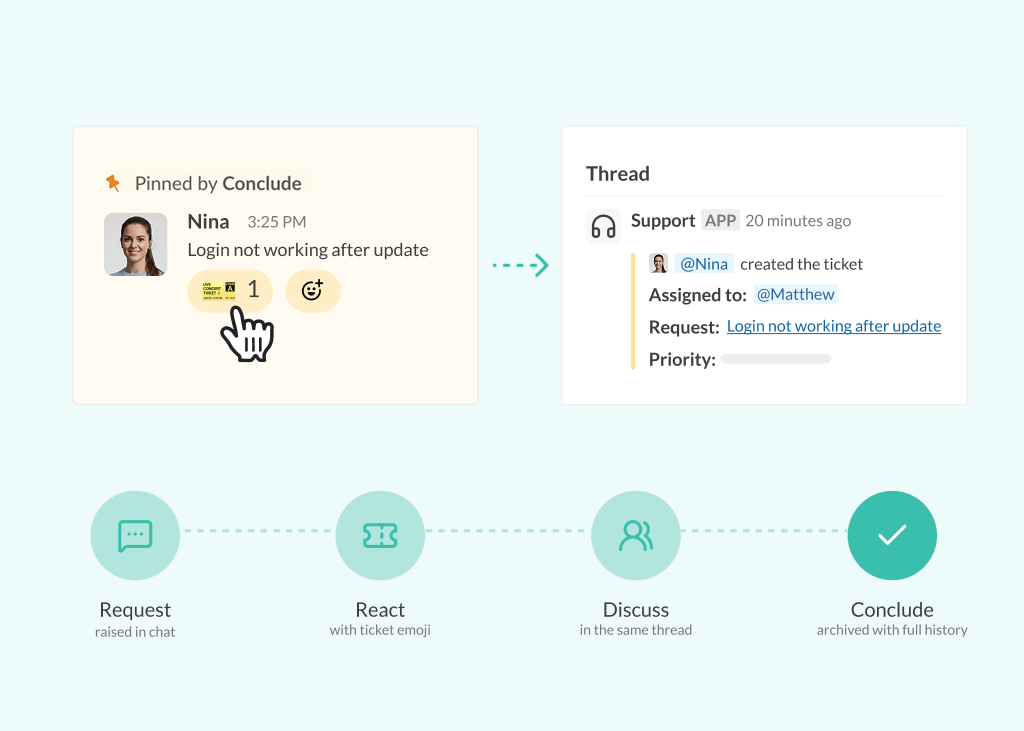
Whether it’s a Slack message, a Teams thread, or a channel discussion, most requests and decisions begin in chat. But in many organizations, the next step happens somewhere else.
Traditional ticketing systems are entirely disconnected from the conversation, creating extra work. Teams must copy information between tools, repeat context, and switch between platforms just to move a request forward.
According to Slack’s 2024 State of Work research, 68% of workers spend at least 30 minutes every day toggling between tools. Those interruptions slow response times, fragment communication, and make work harder to track.
Conversational ticketing removes that friction by bringing ticketing into the flow of communication. Instead of moving requests into a separate system, teams can create, manage, and resolve tickets directly inside Slack or Microsoft Teams, where the conversation is already happening.
In this guide, you’ll learn what conversational ticketing is, how it works, its benefits and use cases, and how your team can set it up in Slack and Microsoft Teams.
What Is Conversational Ticketing?
Conversational ticketing is a workflow model in which tickets are created and managed directly within communication platforms such as Slack or Microsoft Teams.
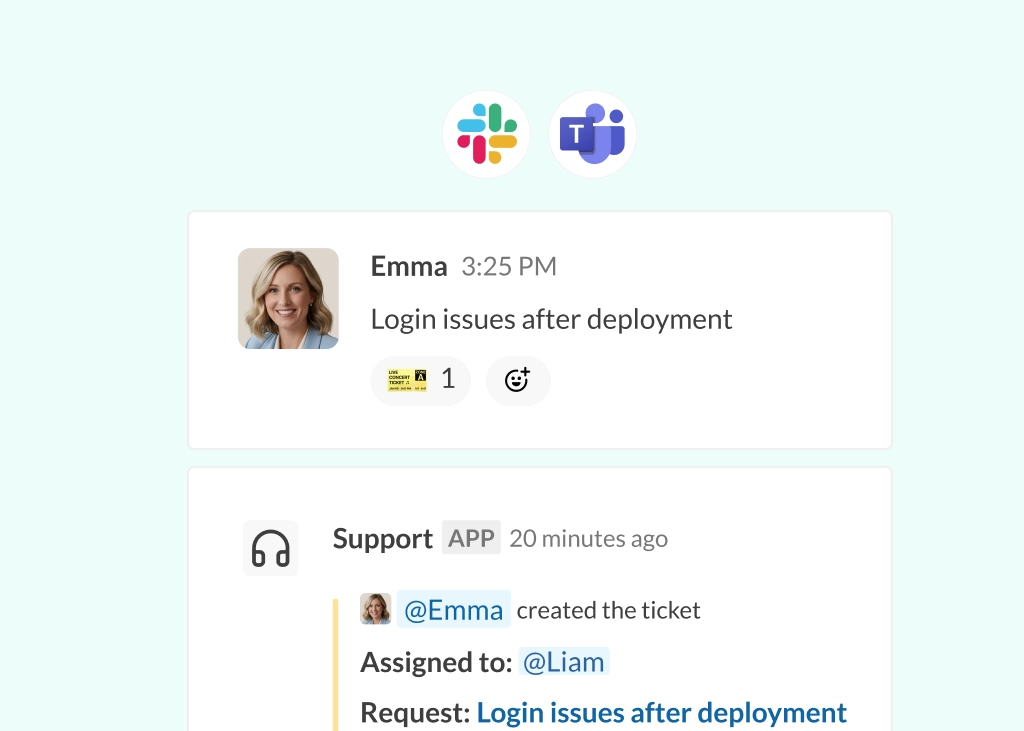
Instead of moving requests into a separate ticketing system, teams can turn messages into tickets directly from the conversation itself. A request raised in chat becomes a ticket, while the discussion, updates, and decisions stay connected in the same place.
Compared to traditional ticketing systems, the workflow looks very different:
- Traditional Ticketing System: Someone leaves the conversation, opens another tool, manually creates a ticket, and copies over the relevant details
- Conversational Ticketing: The request becomes a ticket directly from the chat, while the conversation, updates, and context stay connected throughout the workflow
Conversational ticketing is often associated with Customer Support, but the same approach applies far beyond it. Any operational workflow that involves requests, tasks, or issues can use conversational ticketing, from internal IT requests to project coordination and external collaboration.
How Conversational Ticketing Works
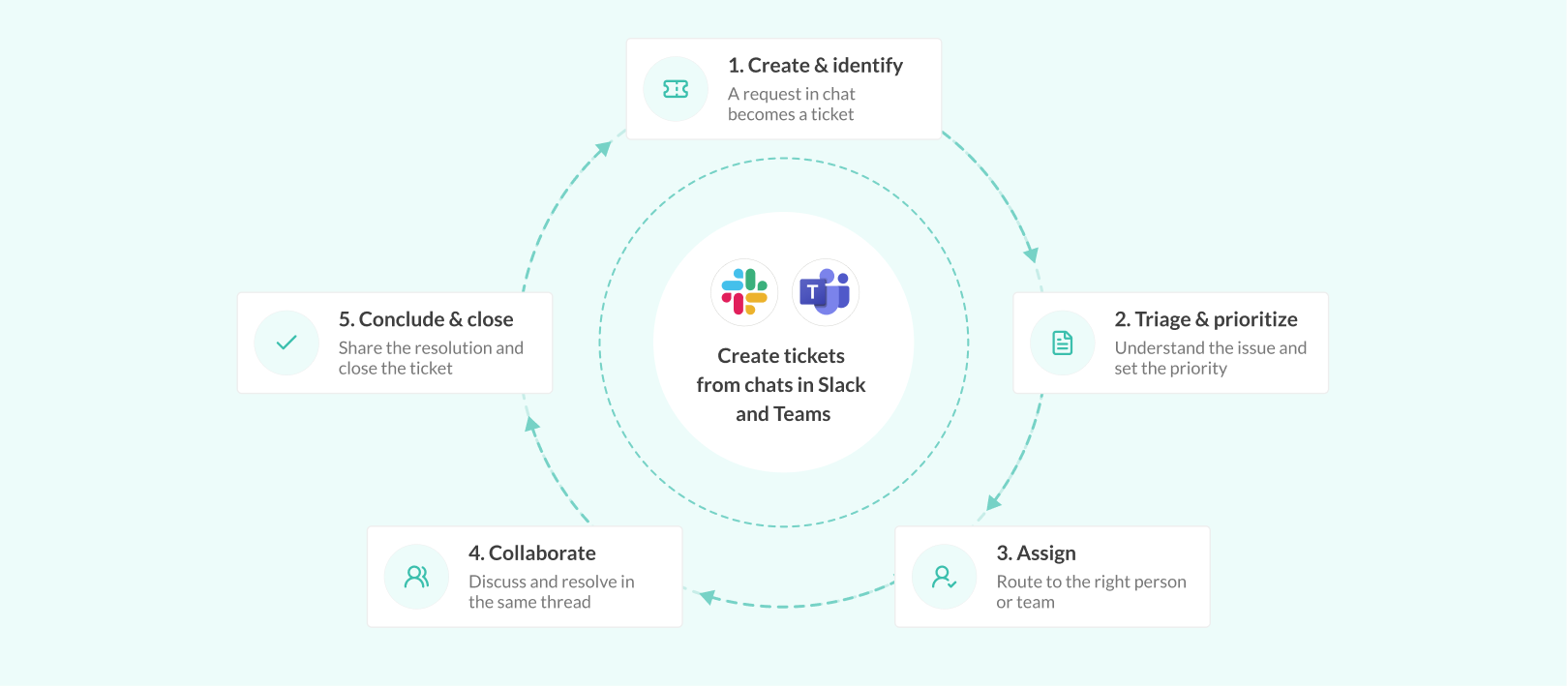
Conversational ticketing follows a simple flow because it builds on how teams already communicate:
- A request is raised in a chat – Someone (a client or support agent) reports an issue, shares feedback, or flags work that needs action in a channel, chat, or message thread
- The message becomes a ticket – The request is converted into a ticket directly from the conversation, often using an emoji, command, or other automation
- Progress continues in the same conversation – Updates, discussions, assignments, and resolutions happen in the same thread or channel while the ticket stays synced in the background
- The ticket is resolved – The ticket is resolved, while the full conversation history remains attached to it
With this setup, teams no longer need to recreate context, search across tools, or manually connect discussions back to the work being tracked.
Benefits of Conversational Ticketing
By keeping tickets connected to conversations, conversational ticketing changes how teams manage requests, collaborate, and track work.
Here are some of the biggest benefits of conversational ticketing.
Reduced Context Switching
Most requests and issues already start in Slack or Microsoft Teams. Without conversational ticketing, users have to leave that conversation, open another tool, and recreate the request from scratch.
Conversational ticketing removes that extra step:
- Tickets can be created directly from conversations without opening another platform
- The original discussion stays attached to the workflow, reducing duplicated information and missing context
- Teams can follow the full history of a request without searching across multiple tools
Faster Response and Resolution Times
Turning conversations directly into tickets removes the delay between identifying a problem and acting on it.
- Requests can be assigned, escalated, or tracked immediately from chat
- Discussions, updates, and decisions happen in the same thread as the work itself
- Teams spend less time transferring information between systems or clarifying missing details later
This makes conversational ticketing especially useful for high-priority, time-sensitive workflows like IT support, customer support, incident management, and operational requests.
Reduced Business Costs
Faster resolution times also help reduce operational costs. In fact, live chat saves 50% compared to other support methods. When teams spend less time managing requests, switching between systems, or recreating context, they can handle more work in less time.
- Teams spend less time on repetitive administrative work and manual coordination
- Lower handling time reduces the operational cost of each request or ticket
- More efficient ticketing workflows allow teams to scale without increasing headcount
Improved Visibility Across Teams
When tickets live inside conversations, it becomes easier to follow what’s happening across teams without chasing updates:
- Teams can track requests directly from shared conversations
- Progress stays visible without relying on separate status updates or manual reporting
- Conversations and decisions remain connected to the ticket throughout the workflow, reducing siloed communication
Humanizes Support for Customers and Clients
Conversational ticketing makes support interactions feel less formal and easier to manage, especially for customers and external stakeholders:
- Customers can raise requests in the same way they already communicate, making communication feel more natural
- Teams can respond directly instead of moving discussions into separate portals, so support feels less transactional
- Feedback, updates, and resolutions remain part of the same ongoing conversation, avoiding risks of communication gaps
Conversational Ticketing in Slack and Microsoft Teams
Slack and Microsoft Teams are ideal environments for conversational workflows because work is already happening there. Requests, approvals, issues, and decisions naturally happen in chat, making it easier to turn conversations directly into structured workflows without switching tools.
Because teams already collaborate in these platforms, conversational ticketing is also easier to adopt. Communication is faster, workflows remain visible, and teams can manage requests in the same place where work already happens.
Conversational ticketing shifts the potential of Slack and Teams beyond messaging. They can serve as workflow hubs for multiple use cases across departments within your organization. Let’s explore them further.
Types of Conversational Ticketing
Conversational ticketing can support far more than customer support workflows. Any process that involves requests, approvals, issues, or tasks can be managed this way.
In practice, conversational ticketing usually falls into two broad categories:
- Company-Wide Workflows: IT Support, HR requests, project and task coordination, engineering requests
- Customer/Client Workflows: Customer support, customer success, project management, client or agency collaboration
Below are some of the most common use cases for conversational ticketing across organizations.
Conversational Ticketing for Customer Support and Customer Success
Customer support is one of the most common use cases for conversational ticketing because support requests already begin in conversations.
Instead of asking customers or internal teams to submit requests through separate portals, support teams can manage tickets directly from Slack or Microsoft Teams while keeping the discussion connected to the workflow.
This is especially useful for:
- Managing shared customer support channels
- Help desk conversational ticketing for internal support
- Coordinating onboarding and customer success workflows
Conversational Ticketing for HR Support
HR teams often manage repetitive operational requests across onboarding, leave approvals, policy questions, and internal support.
Conversational ticketing helps HR teams handle those workflows directly in Slack or Microsoft Teams, making requests easier to track without relying on long email chains or disconnected forms.
Common HR workflows include:
- Employee onboarding and equipment requests
- Internal approvals and policy questions
- Leave management and operational HR support
Conversational Ticketing for Project and Task Management
Projects and operational work often begin informally in conversations before becoming structured tasks.
Conversational ticketing allows teams to turn discussions in Slack or Microsoft Teams directly into trackable workflows while keeping the original conversation attached to the work.
Teams commonly use this for:
- Cross-functional project coordination
- Internal approvals and operational requests
- Task tracking across product, marketing, and operations teams
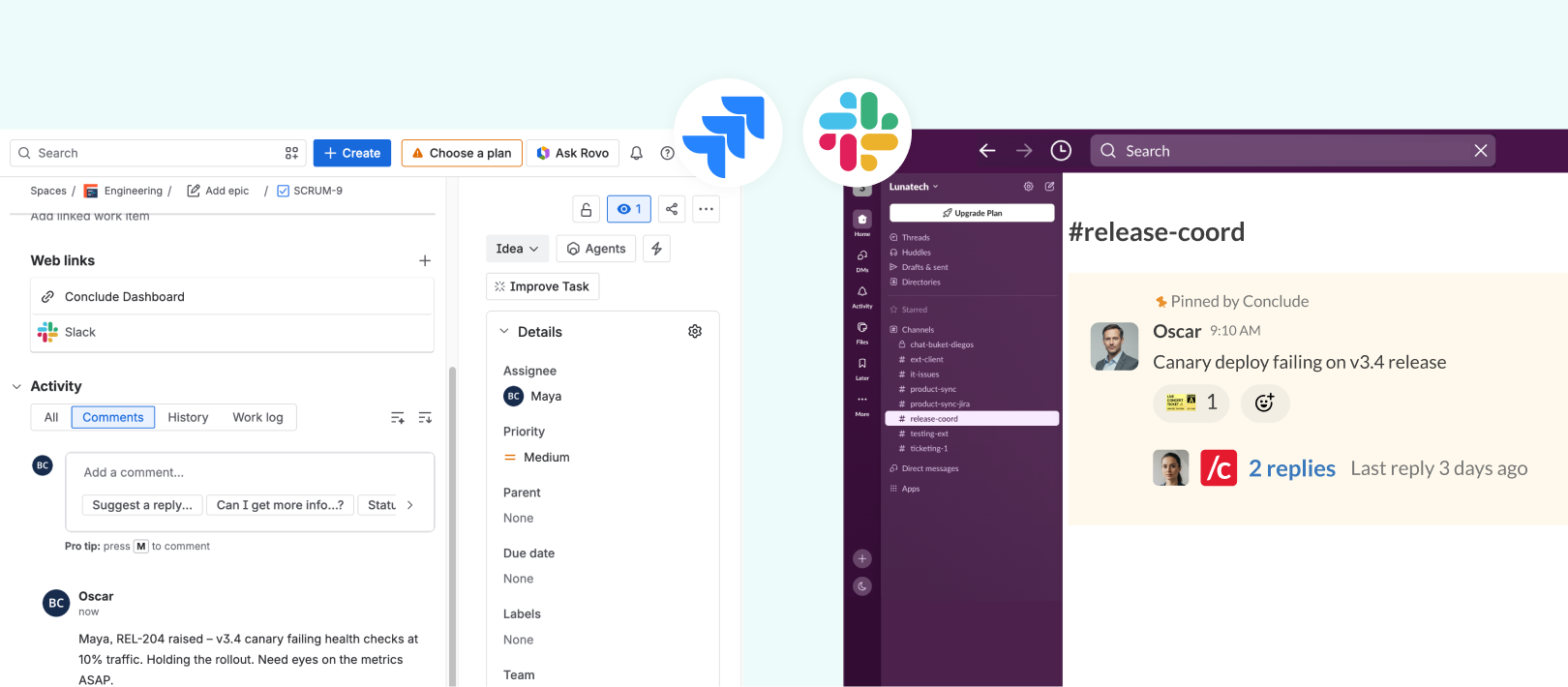
If you’re using existing project management tools like Jira, some solutions offer Slack-Jira or Microsoft-Jira integrations that sync chats that have been turned into tickets directly with the tool, creating a Jira conversational ticketing setup.
Conversational Ticketing for Engineering and Development Support
Engineering teams constantly manage bugs, incidents, feature requests, and operational issues that emerge during day-to-day collaboration.
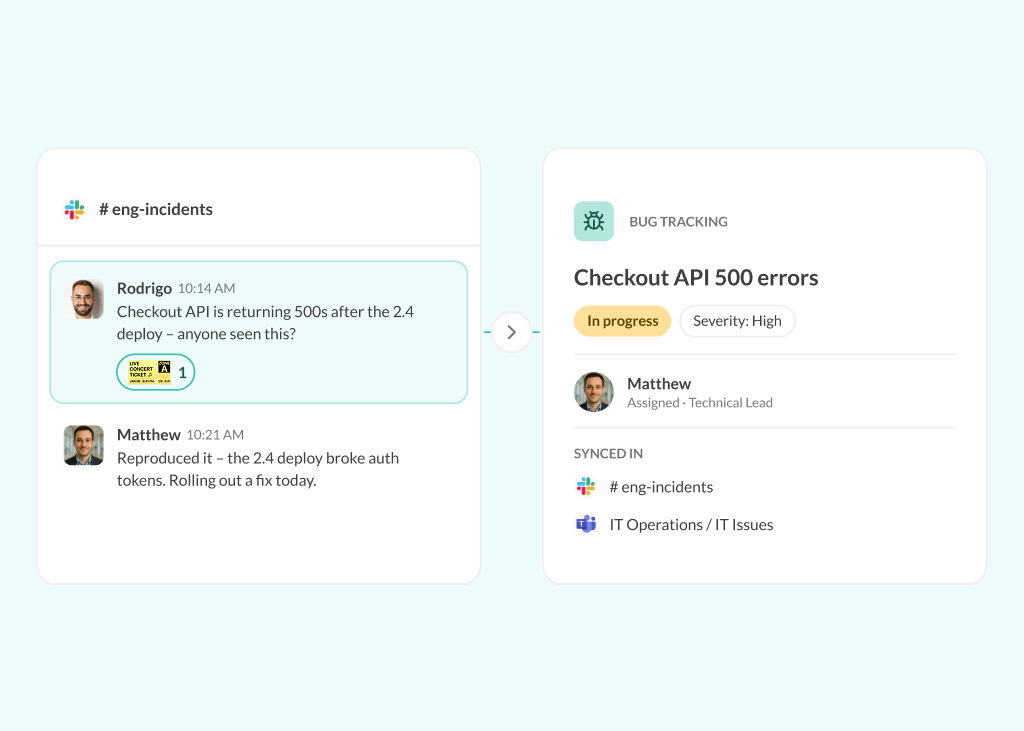
Conversational ticketing allows those issues to be captured directly from Slack or Microsoft Teams while keeping technical discussions tied to the ticket itself.
This system can be used for:
- Bug tracking and incident management
- DevOps escalations and operational support
- QA workflows and feature request tracking
Conversational Ticketing for Client and Agency Collaboration
Client work often involves ongoing feedback, approvals, revisions, and execution requests shared across conversations.
Conversational ticketing allows agencies and client teams to turn those requests into structured workflows directly from shared Slack or Microsoft Teams channels, without forcing a client to leave their preferred messaging platform.
Use conversational ticketing for:
- Managing client feedback and revision requests
- Coordinating project execution across teams
- Tracking approvals, escalations, and deliverables
Because conversations and workflows stay connected, both internal teams and clients have better visibility into progress without relying on disconnected email threads or manual status updates.
For a closer look at how this works in practice, read our article on Agency‑Client Collaboration in Slack and Teams.
Conversational Ticketing With Conclude
Conclude brings conversational ticketing directly into Slack and Microsoft Teams, allowing teams to manage workflows without separating conversations from execution.
Depending on how teams work, Conclude offers:
- Conclude Apps: Allows you to create and manage ticketing workflows directly inside Slack or Microsoft Teams. Ideal for teams that want to structure requests, track work, and manage processes within a single platform
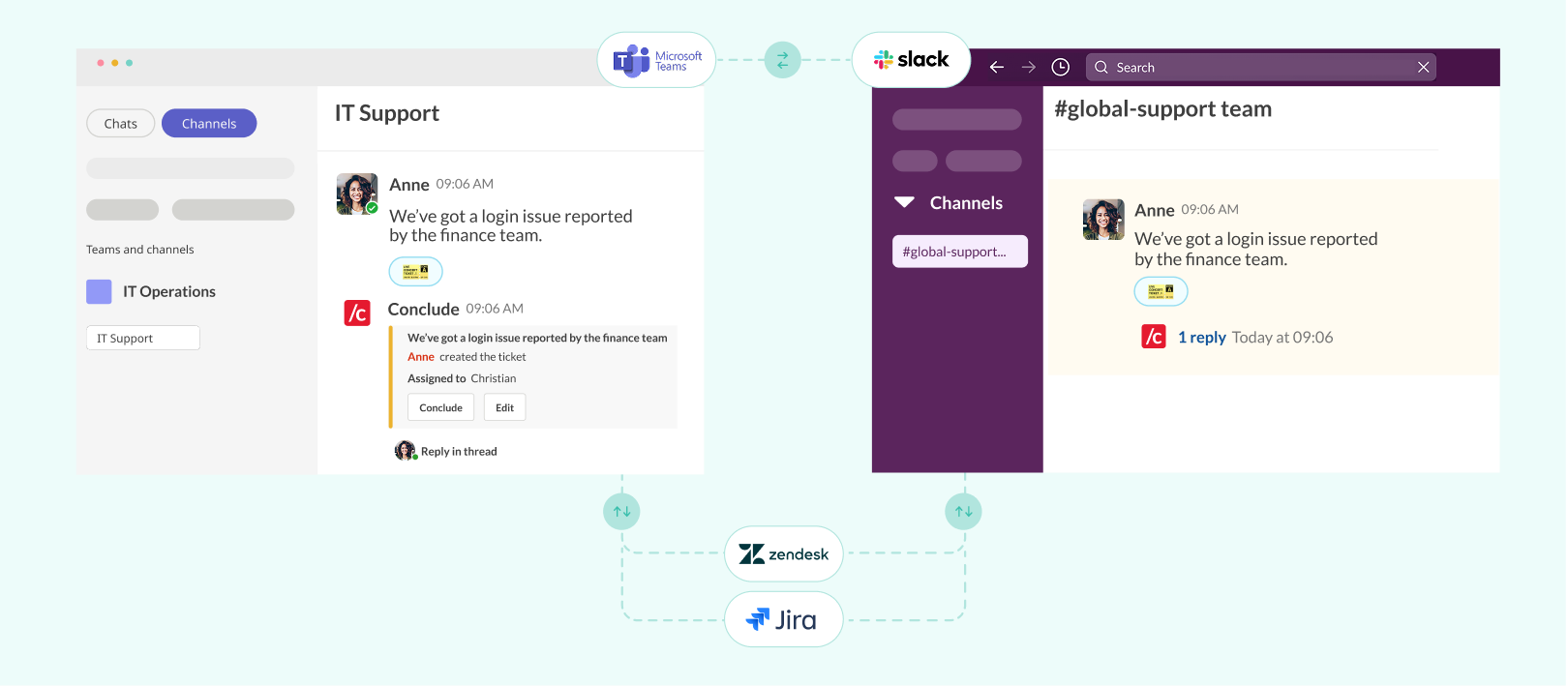
- Connected Apps: Connects Slack and Microsoft Teams, enabling teams to collaborate and manage communication and ticketing across both platforms without consolidating tools or moving workflows. Ideal for any workflows that require cross-platform collaboration
What Conclude Adds to Conversational Ticketing
Conclude makes conversational workflows easier to manage at scale across teams, platforms, and existing systems. It offers a smooth conversational ticketing experience via:
- Bi-Directional Synchronization of Tickets: Updates, conversations, and ticket changes stay aligned in real time, so teams don’t have to manage information in multiple places
- Ticket Creation Directly From Chat: Tickets can be created using a command or even a simple emoji, making it easy to capture requests as they come up
- Integrations With Zendesk and Jira: Conclude offers a Zendesk integration and a Jira integration, so that teams can keep their existing systems connected to Slack and Teams
- Cross-Platform Collaboration Across Slack and Teams: Connected Apps is the only solution that supports cross-platform ticketing, allowing teams to collaborate across Slack and Microsoft Teams
- Single License Across Platforms: Connected Apps lets companies manage workflows in Slack and Microsoft Teams from a single messaging platform, so there’s no need for separate licenses or duplicate setups
- Flexible, No-Code App Customization: Teams can use conversational ticketing for any workflow, without needing to build or maintain custom integrations or code
Conclude Apps
Conclude Apps focuses on creating and managing ticketing workflows directly inside Slack or Microsoft Teams. They allow teams to structure and track work without leaving their primary collaboration platform.
Conclude Apps support a wide range of workflow types, including:
- Incident management
- Issues and bug tracking
- Help desk and support requests
- Project and operational workflows
- Customizable no-code workflows
This solution is best suited for teams managing workflows primarily within a single platform, where communication and execution already happen in the same space.
See how Etleap used Conclude Apps with Zendesk to deliver technical, high-touch support for their customers.
Connected Apps (part of Conclude Apps)
Connected Apps extends conversational ticketing beyond a single platform by connecting Slack and Microsoft Teams. Teams can collaborate across both environments while keeping workflows and communication fully aligned.
Connected Apps supports:
- Client, partner, and agency collaboration
- Organizations using both Slack and Microsoft Teams
- Cross-functional collaboration between teams on different platforms
- Shared workflows that need to stay aligned across communication platforms
This functionality is designed for organizations that need to connect teams across platforms while maintaining a single, continuous workflow.
Conversational Ticketing Is The New Way To Manage Work
Conversational ticketing changes how teams manage work. Instead of moving requests, issues, and tasks into a separate system, teams can create and manage tickets where the conversation is happening.
As workflows move into Slack and Microsoft Teams, you can transform them into operational environments where teams can manage requests, collaborate on work, and resolve issues without constantly switching systems or recreating context.
Conversational ticketing isn’t limited to customer support, either. Any workflow that begins with a conversation can follow the same model, from IT support and engineering requests to project coordination and client collaboration.
Conclude helps teams bring conversational ticketing directly into Slack and Microsoft Teams, with true, bi-directional sync that keeps your platforms connected in real-time. Simply choose the right solution based on your setup: Conclude Apps for single-platform ticketing, or Connected Apps for cross-platform conversational ticketing workflows.
Looking to bring conversational ticketing into your everyday workflows? Start your 14-day free trial with Conclude today.
Frequently Asked Questions
What’s the difference between conversational ticketing and traditional ticketing?
The main difference is where and how tickets are created and managed. In traditional ticketing systems, users must leave their conversation, open a separate tool, and manually create a ticket. This often leads to duplicated information, lost context, and slower response times.
Conversational ticketing, on the other hand, allows tickets to be created directly from conversations in platforms like Slack or Microsoft Teams. The discussion, context, and workflow stay connected, reducing friction and improving collaboration.
What is a conversational ticketing system?
A conversational ticketing system allows teams to create, manage, and track tickets directly inside communication platforms like Slack or Microsoft Teams. Requests raised in chat become structured workflows without needing a separate portal or ticketing tool.
What is conversational customer service?
Conversational customer service is a support approach where customer interactions happen through real-time messaging rather than traditional ticket forms or email chains. Customer service teams can turn those conversations into structured tickets without interrupting the interaction, allowing them to provide faster, more contextual support while keeping workflows organized.
What can conversational ticketing be used for?
Conversational ticketing can be used for any workflow that begins with a request, issue, or task in a conversation. This includes internal company processes such as IT support, HR requests, project and task coordination, and engineering workflows. It also applies to customer and client-based workflows, including customer support, customer success, and client or agency collaboration.
Can you use Microsoft Teams as a ticketing system?
Yes, Microsoft Teams can be used as a ticketing system when combined with conversational ticketing tools. This allows you to create, manage, and track tickets directly within your Teams conversations. Some tools even allow you to integrate Microsoft Teams with Jira or Zendesk while keeping communication and execution in one place.