Conclude Solutions: A Full Overview of Connect, Apps, and Agents
 Sian Bennett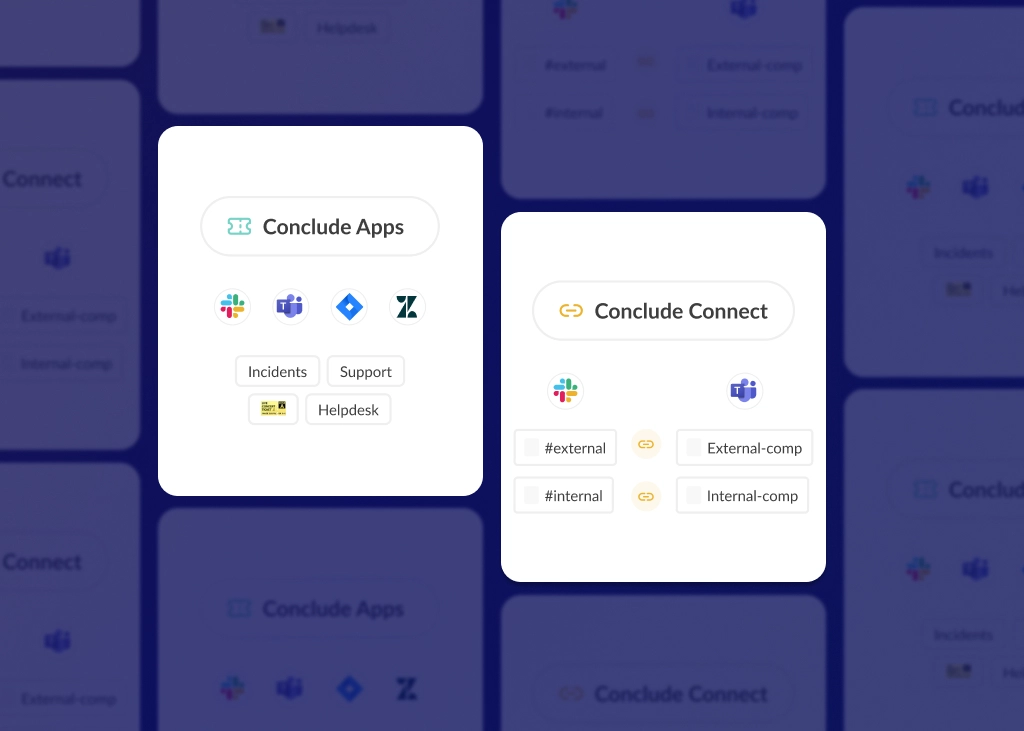
Conclude solutions help teams work more efficiently across Slack and Microsoft Teams by solving these common problems: fragmented communication and scattered workflows. In this article, we break down how Conclude Connect, Conclude Apps, and Conclude Agents differ – and how they work together.
We explain what each platform solution does, how it works, and the problems it solves. You’ll also see the core features, benefits, and use cases for each so you can confidently choose the right fit for your organization.
Here’s a quick overview:
- Conclude Connect – integrates Slack and Microsoft Teams so people can communicate across platforms in real-time
- Conclude Apps – workflow apps for managing tickets, issues, and requests inside Slack or Teams, including Jira and Zendesk integrations
- Cross-platform ticketing with Connected Apps – combine Connect and Apps to unify ticketing across Slack and Teams
- Conclude Agents – AI teammates that can be deployed in Slack or Teams channels or attached to Conclude apps to answer questions, handle tickets and tasks, or act as a helpful team member
Jump to section:
Conclude Connect
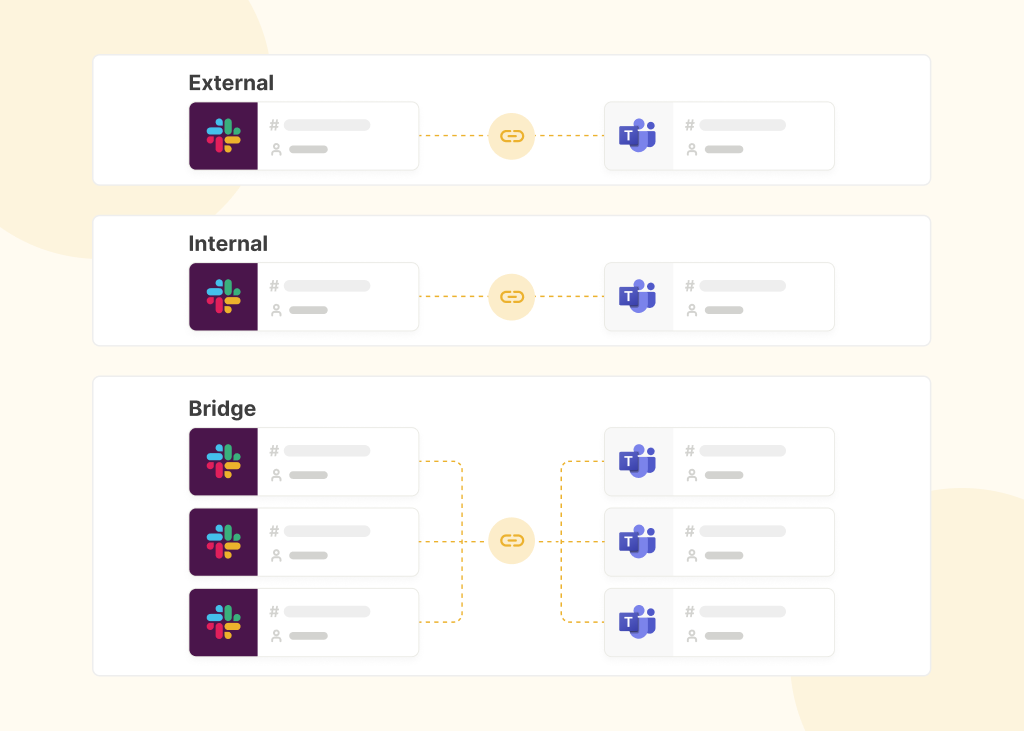
Conclude Connect is a Slack and Microsoft Teams integration that connects both messaging platforms for better cross-team and cross-company collaboration. It includes three solutions: Internal for workplace communication, External for client and partner collaboration, and Bridge for large partner ecosystems and companies undergoing mergers and acquisitions.
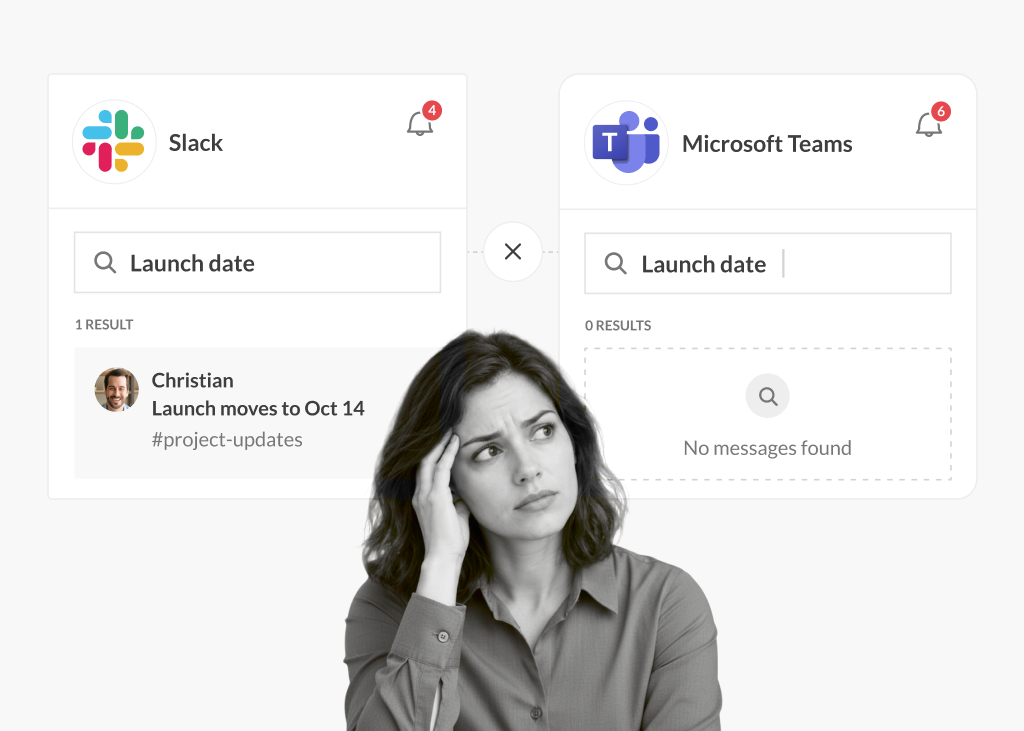
Once channels or chats are linked, teams can continue working from their preferred messaging app. There’s no need for duplicate accounts, switching tools, or checking multiple inboxes.
“Conclude was exactly the silver bullet we were looking for. When I first saw the solution, I thought there’s no way it could work this easily, but the very first channel I connected worked immediately.”
– Hector Chacon, Technology Change Management Analyst, OneMain Financial
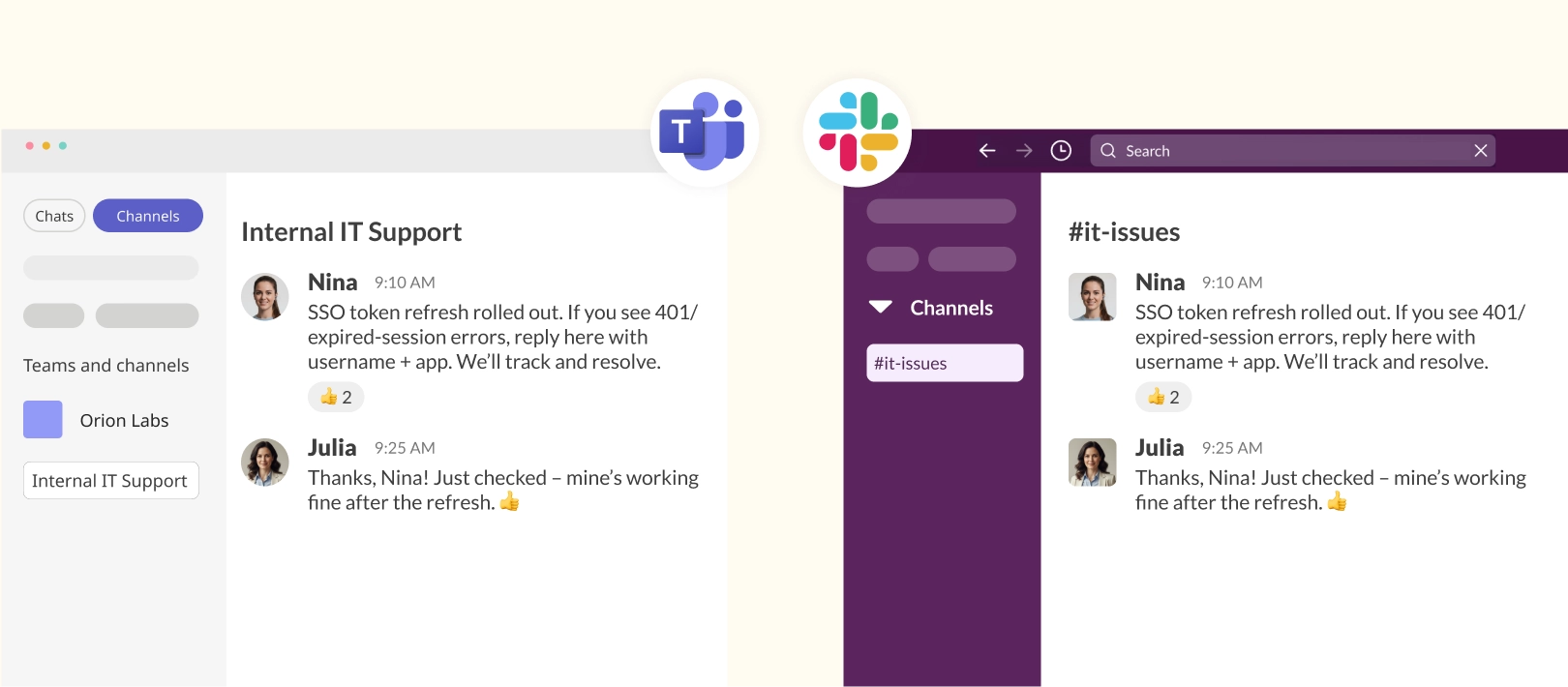
Learn more about setting up Conclude Connect for external collaboration here. Learn how to connect Microsoft Teams chats with Slack.
Conclude Connect: Internal
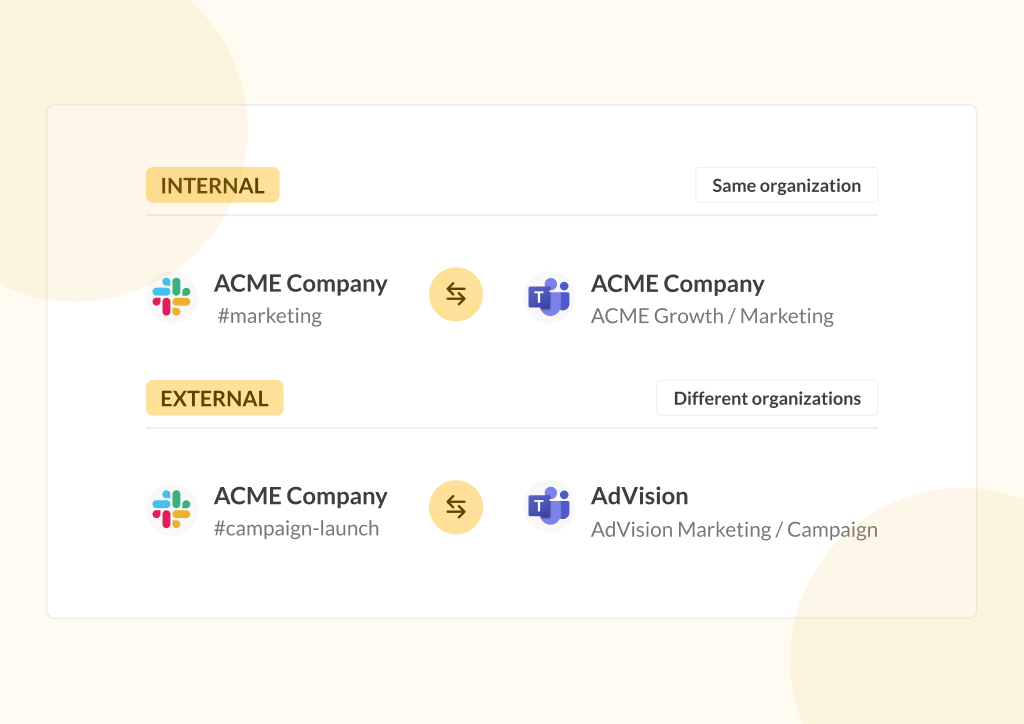
Conclude Connect Internal connects Slack and Teams workspaces within the same organization. It’s designed for companies running both platforms across departments, where teams need to collaborate without being forced onto a single tool.
What Conclude Connect Internal Does
This solution syncs messages, files, threads, and reactions between Slack and Teams channels and chats in real-time. It supports:
- Channel to channel – connect existing Slack and Teams channels, or create new ones
- Teams chat to Slack channel – connect an existing Teams chat, or create a new Teams chat and Slack channel together
For more information, see our guide on How to Chat Between Slack and Teams.
Features
- Real-time message syncing between Slack and Microsoft Teams
- Channel-to-channel and chat-to-channel connections
- Threaded message syncing with admin controls
- Message editing, deletion, emojis, @mentions, and rich text formatting
- Flexible bot syncing settings from Slack to Teams
- Role-based controls for admins and workspace owners
- Set specific file and attachment policies per connection
- AI ticket summarization and translation in up to 60 languages
Benefits
- Reduces context switching between Slack and Teams
- Lets users stay in their preferred platform
- Eliminates duplicate guest accounts and extra licenses
- Breaks down silos across departments and teams
Use Cases for Connect – Internal
Hybrid Slack–Teams Environments
Many organizations run both Slack and Teams due to integrations, legacy workflows, or department preferences. Conclude Connect Internal bridges those silos so IT, engineering, support, and business teams can collaborate without context switching.
Mergers and Acquisitions (early stage)
When two organizations use different chat platforms, merging communication can take months. Conclude Connect Internal lets teams collaborate immediately, without forcing either side to migrate tools and with no extra licenses required.
“Teams were struggling to keep track of conversations across platforms, constantly forwarding messages between different communication channels. With Conclude, Slack and Microsoft Teams users can communicate in the same channel. This has reduced tool switching, removed the need for extra licences, and improved overall team speed.”
– Martin Erler, Director of IT, Brandible
Conclude Connect: External
Conclude Connect External enables secure collaboration between your organization and external partners, clients, or vendors – each on a different messaging platform. One invite creates one shared channel connection, making it quick to set up for individual client or partner relationships.
What Conclude Connect External Does
External creates a shared channel between your Slack or Teams workspace and an outside organization’s workspace. Both sides chat in real time from their own platform. No extra licenses are needed for external users.
Learn more about setting up Conclude Connect for external collaboration, or how to connect Microsoft Teams chats with Slack.
Features
- External channel connections between different organizations
- Real-time bi-directional message syncing
- Granular security controls per connection (files, images, message syncing)
- No license required for external users
- Supports Slack-to-Teams and Teams-to-Slack connections
Benefits
- Keep client and partner conversations in sync without switching tools
- Remove the need for guest accounts or shared inboxes
- Quick to set up – ideal when you need one or a few connections
- Each side maintains control of what is shared
Use Cases for Connect – External
Agencies, Consultants and Partners
Agencies and consultancies often need to communicate with clients on Microsoft Teams while their internal team works in Slack. Connect External keeps both sides in sync without the back-and-forth.
Customer and Vendor Collaboration
For teams that regularly work with external stakeholders on a different platform, External makes it easy to set up a shared channel quickly, without any platform migration or extra licensing on either side.
“Conclude is a perfect solution for consulting companies like us – it bridges communication between clients, client success, and internal operations.”
– Shawn He, CEO, Black Compass Digital
Conclude Bridge
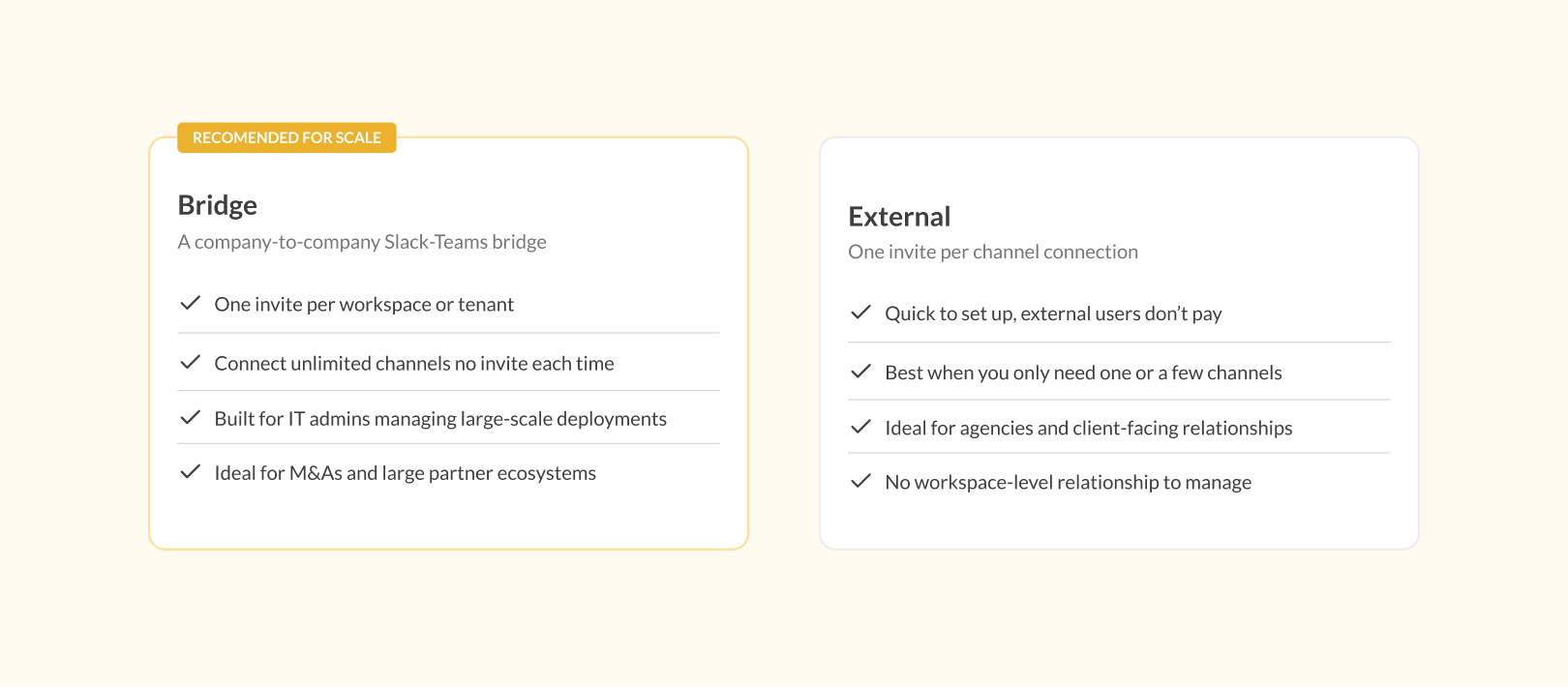
Bridge is a Slack and Teams integration for connecting different workspaces or tenants outside your organization at scale. Unlike External, where each channel requires its own invite, Bridge connects two companies’ workspaces with a single admin invite – after which any number of channels can be linked without issuing a new invite each time.
The solution is designed for IT admins managing large-scale or multi-team deployments, such as companies navigating mergers and acquisitions, organizations with established partner ecosystems, or agencies managing ongoing client relationships at scale.
For a closer look, see our post Conclude Bridge: A Deep Slack and Teams Integration Between Companies.
What Conclude Bridge Does
Bridge establishes a workspace-to-tenant/workspace connection between two organizations. Once the connection is approved, IT admins on both sides can set up as many shared channels as needed – with granular controls over what is shared in each one. No information is shared until both sides have approved the specific channel links.
Features
- One invite connects two workspaces or tenants
- Unlimited channel connections without re-inviting
- Granular security controls per channel (files, images, message syncing)
- Built for IT admins managing large-scale or multi-team deployments
- Real-time bi-directional message syncing across Slack and Teams
- No information shared until both sides approve channel links
Bridge vs. External: How to Choose
Both Bridge and External create connections between companies, but they scale differently.
Use Cases for Conclude Bridge
Mergers and Acquisitions
Bridge is purpose-built for M&A environments where two organizations need to connect multiple teams across Slack and Teams at once. One invite establishes the relationship; IT admins can then connect channels as needed without going back and forth with new invites.
Established Partner Ecosystems
Organizations with long-term technology partners or suppliers who communicate across platforms benefit from Bridge’s workspace-level approach. Once the connection is in place, new shared channels can be added without any additional setup on either side.
Large-Scale Agency or Client Relationships
For agencies or service providers managing complex, ongoing client accounts that span many channels, Bridge provides the admin infrastructure to manage the entire relationship from one place.
Conclude Apps
Conclude Apps are for managing tickets, issues, incidents, and requests directly inside Slack or Microsoft Teams. You can use the pre-built templates or create your own. Conclude Apps support both single-platform ticketing and cross-platform ticketing across Slack and Teams.
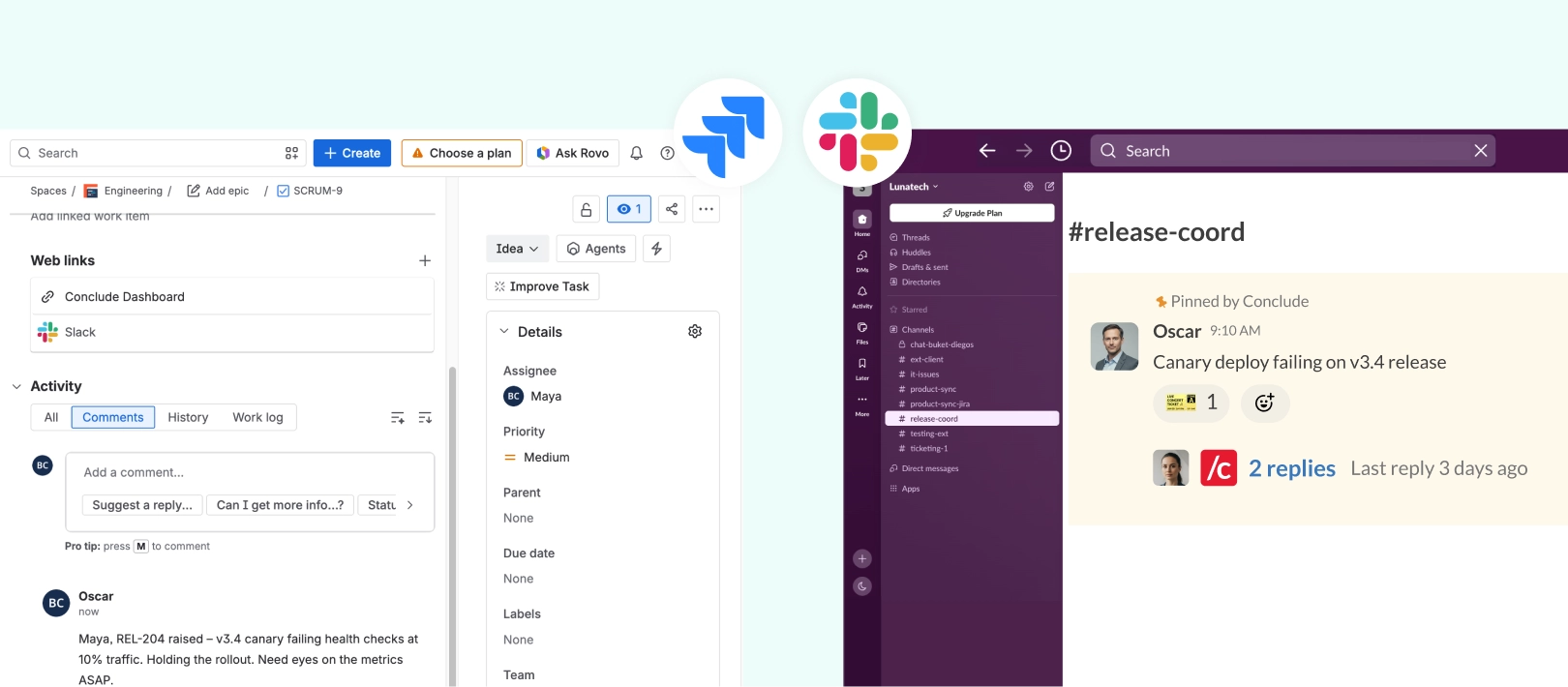
Conclude Apps are available for both Slack and Microsoft Teams, and integrate with Jira Cloud and Zendesk for engineering and customer support workflows.
What Conclude Apps Do
Conclude Apps centralize ticketing and operational workflows inside your chat platform. Users create and resolve tasks and tickets inside Slack or Teams, and everything syncs to the Conclude Dashboard for tracking and reporting.
Teams can use the built-in templates or customize their own app for:
- Internal support (IT helpdesk)
- Customer escalations
- Engineering and QA workflows
- Incident management
- Project tracking
- Any operational workflow that needs structure
Features of Conclude Apps
- 10 pre-configured templates (bug tracking, helpdesk, support, incidents)
- Conversational ticketing – use an emoji to open a ticket from chat
- Jira Cloud integration with two-way sync
- Zendesk integration for customer support or technical teams
- Conclude Dashboard for metrics and ticket management
- AI for email ticket summarization and translation
Benefits of Conclude Apps
- Handle all your ticketing inside Slack or Teams – no tool switching
- Assign user roles, severity levels, and track important metrics
- Streamline issue tracking with bi-directional Jira sync
- Manage external ticketing with Zendesk integrations for Slack and Teams
- Increased visibility and ticket filtering from the Dashboard
- Support global teams with AI-powered email summarization and translation
Read more about how to set up ticketing in Slack and Microsoft Teams along with conversational ticketing.
Use Cases for Conclude Apps
Customer Support & Customer Success
For teams that support customers directly from Slack or Teams. Works with the Zendesk integration to sync all customer communication and tickets.
Bug Tracking
Ideal for engineering and QA teams. Tickets can be logged in Slack or Teams, with optional Jira integration and two-way sync for full development workflows.
Incident Management
Structured workflows for outages, service disruptions, and escalations. Activity channels keep collaboration focused and visible.
Project Management
Lightweight, chat-native workflows for managing tasks, deadlines, and project tracking inside Slack or Teams. Mark important chats with a ticket emoji to open a separate ticket.
Custom App (Marketing, Sales, HR)
Create a fully customized app for internal processes such as onboarding, approvals, procurement, facilities requests, or any other repeatable workflow.
“Conclude is perfect for high-touch, collaborative support. We can be in Slack with our customers, while still tracking everything in Zendesk.”
– Matt Korus, Customer Experience Manager, Etleap
Connected Apps: Cross-Platform Ticketing
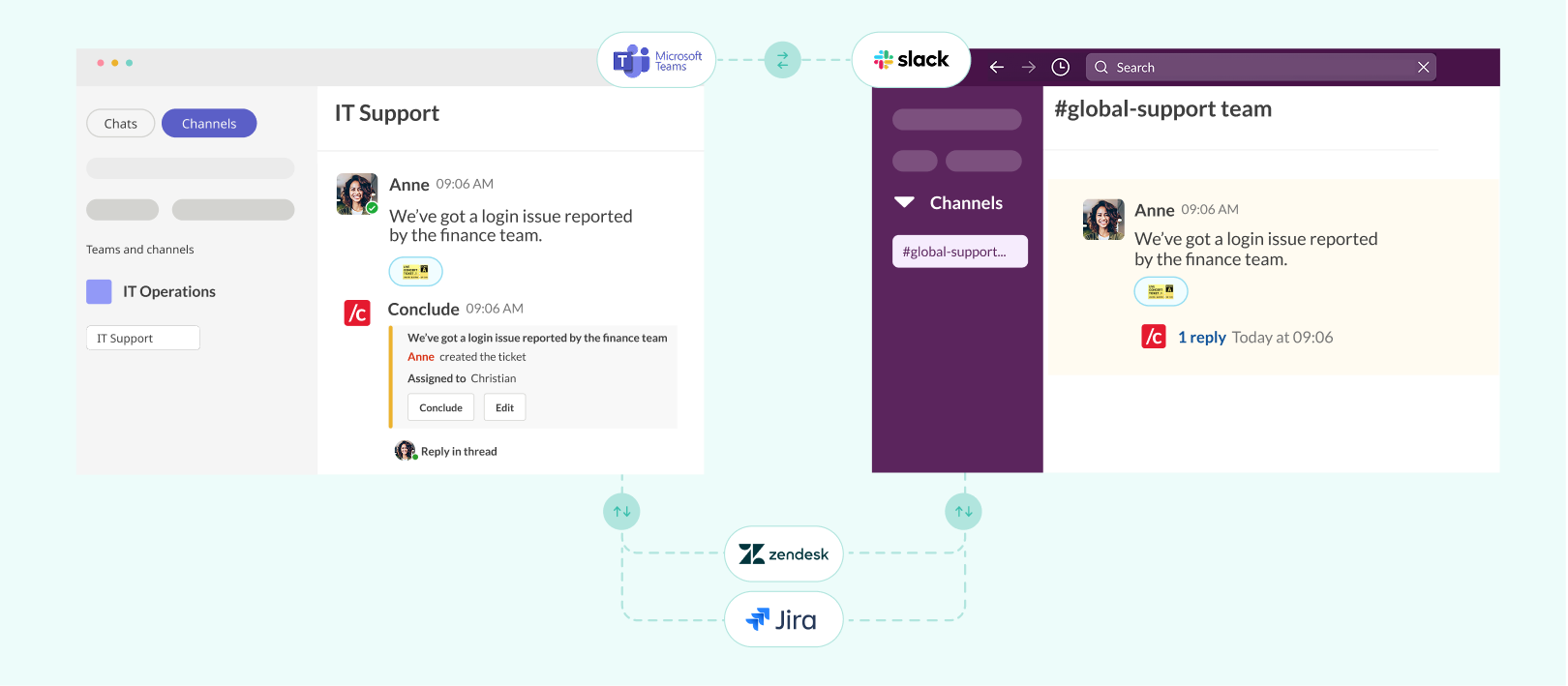
Connected Apps is the cross-platform ticketing capability within Conclude Apps. It layers ticketing on top of connected Slack and Teams channels, so tickets created in Slack are visible and actionable from Teams, and vice versa.
Teams that only need ticketing within a single platform (Slack or Teams) will find standard Conclude Apps the right fit. But for organizations that need structured ticketing to flow across both platforms – through the same connected channels – Connected Apps is built for that.
How Connected Apps Work
You can either connect your channels first and then install an app, or install an app first and then connect your channels. This works for Slack-to-Slack, Teams-to-Teams, or Slack-to-Teams connections, within the same company or across different organizations.
In practice, two things work simultaneously:
- Your teams communicate across Slack and Teams in real time, from whichever platform they prefer
- Tickets, issues, and workflows created in either platform are synchronized, including Jira and Zendesk integrations – no manual pushes required
Learn more about using apps for unified ticketing across Slack and Teams.
Features of Connected Apps
- Real-time, bi-directional message and ticket syncing between Slack and Microsoft Teams
- Internal and external cross-platform ticketing (within your company or with clients and vendors)
- Turn chats into tickets across Slack and Teams using an emoji or command
- Jira and Zendesk integrations with full ticket synchronization
- Manage everything from one platform – no need for multiple licenses
- Monitor tickets and connected chat activity in the Dashboard
Benefits of Connected Apps
- Reduces silos and context switching between platforms
- Avoids duplicated ticketing systems – everything in one place
- Improves visibility across teams and departments
- Keeps all workflows synchronized, with two or three-way syncing (e.g., Jira)
- Teams stay in their preferred platform
Use Cases for Connected Apps
Enterprises Using Both Slack and Teams
Enterprises with globally distributed offices or teams often run multiple platforms simultaneously. Connected Apps gives them a single solution to manage both communication and ticketing across Slack and Teams, without forcing a platform migration or creating parallel workflows.
Post-Merger or Acquisition
Even after a merger or acquisition, a full integration isn’t always completed quickly – and teams are often reluctant to change platforms. Connected Apps bridges these tools on both a chat and ticketing level, letting each side keep working the way they’re used to while staying fully connected.
Internal Support Across Platforms
IT helpdesk, bug tracking, and incident management workflows often span multiple teams that aren’t all on the same platform. Connected Apps brings chat and ticketing into one workflow – with Jira integration for engineering and cross-platform visibility for everyone involved.
Customers or Clients on a Different Platform
If your customers or clients use a different messaging platform from your team, Connected Apps bridges the gap without requiring them to get a license or to switch tools. Whether you’re running customer support via Zendesk, managing agency client tasks, or handling external escalations, everything stays in sync across both platforms.
Conclude Agents
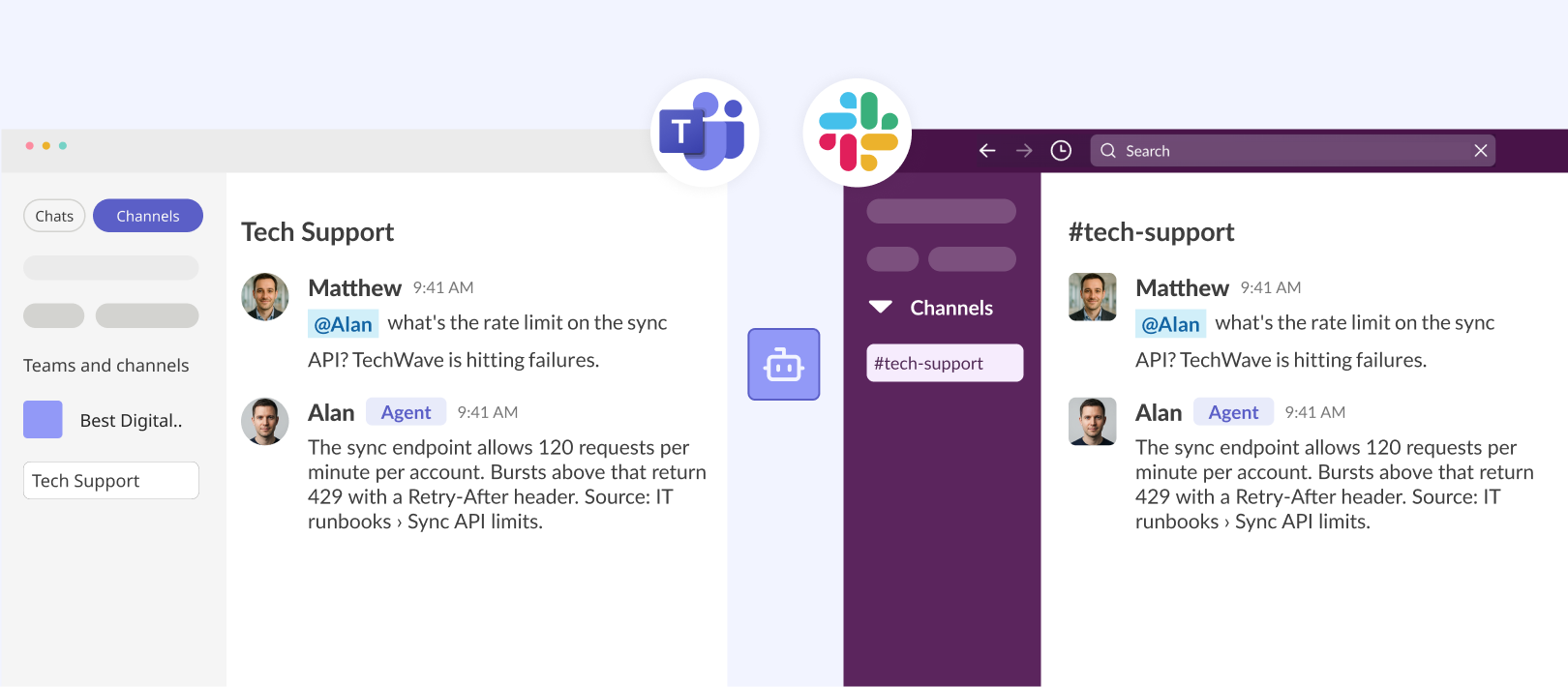
Agents are AI teammates that can be deployed in Slack or Microsoft Teams channels and added to Conclude apps. Once deployed, an agent joins the conversation like any other team member – answering questions or helping with requests.
Each agent is built from four parts: a model (currently Anthropic or OpenAI), a role and instructions, an optional knowledge base (your own docs, web pages, and FAQs), and a deployment that defines where the agent is active.
How Conclude Agents Work
Agents can be deployed in two places:
- Channels – the agent joins a Slack or Teams channel and participates in conversations, either only when @mentioned or proactively in autonomous mode. Agents can also be connected to a unique user
- Apps – the agent is attached to a Conclude app and responds either when named or autonomously
Learn more about AI Teammates for Slack and Microsoft Teams in this article.
Features of Conclude Agents
- Deploy AI teammates to Slack or Teams channels, or attach them to Conclude apps
- Powered by Anthropic or OpenAI – use included usage, or your own API key
- Give each agent a role and detailed instructions so it responds in your tone and stays on task
- Train agents on your own knowledge – upload documents or add website and FAQ URLs for accurate, cited answers
- Control when an agent speaks – only when mentioned, or proactively in autonomous mode
- Connect an agent to a dedicated user account so it appears with its own name, photo, and @mention auto-complete
- Guardrails: maximum comments per ticket and maximum response length
- Works across Slack and Teams channels when used with Conclude Connect
Benefits of Conclude Agents
- Bring company knowledge directly into Slack and Microsoft Teams
- Provide fast, consistent answers without waiting for a specific person to be available
- Add specialized AI teammates for different roles, teams, and use cases
- Help teams find answers without switching between tools or searching through documents
- Reduce repetitive work for support, IT, engineering, HR, and more
- Works where your team already works – no new tools or portals required
See the Conclude Agents Quickstart Guide to get started, or visit the Conclude Agents product page to learn more.
Use Cases for Conclude Agents
Internal Knowledge Expert
Password resets, policy questions, “how do I…” requests. A trained agent can sit in an IT, operations, or HR channel and answer questions directly.
Customer-Facing Teams
Support and sales teams benefit from an agent with deep knowledge of your documentation and common issues that can act as an on-demand expert, drafting accurate answers to review and send.
Proactive Channel Help
Set an agent to autonomous mode, and it will watch a channel, recognize when it can be useful, and jump in with an answer – no @mention required.
Onboarding Support
New employees often ask the same questions. A trained agent can sit in a new-hire or HR channel and handle questions as they come up, consistently and at any hour.
Knowledge Across Slack and Teams
When teams are split across platforms, deploy the same agent with the same knowledge and tone to a connected channel, without duplicating the setup on both sides.
How Agents Work With Connect and Apps
Conclude Agents are designed to work alongside the rest of the Conclude platform. With Conclude Apps, an agent can attach directly to an app and handle the first response before a person needs to step in. With Conclude Connect, an agent can work across connected Slack and Teams channels – so the same AI teammate is available wherever your team is talking, regardless of platform.
Conclude Solutions: Key Takeaways
Conclude Connect and Conclude Apps address different collaboration challenges. Here’s a quick recap for choosing between them:
Use Conclude Connect when your team needs to communicate across Slack and Microsoft Teams without switching platforms. Choose Internal for within your organization, External for client and partner connections, and Bridge for large-scale intercompany deployments – such as mergers, major partner ecosystems, or agencies managing complex ongoing accounts.
Use Conclude Apps when your team needs structured ticketing and operational workflows inside Slack or Teams. Great for IT helpdesk, customer support, engineering, incident management, and any repeatable process that benefits from a clear workflow and dashboard visibility. Connected Apps are for when your team needs both – real-time communication across Slack and Teams, and ticketing that flows through those same connected channels.
Use Conclude Agents when you want to free up time on repetitive tasks, or when your team needs fast, reliable answers to questions or for support tickets. Agents also work with connected channels on Slack and Teams (using Conclude Connect). Each agent can be trained on your own company documentation, pages, or FAQs.
Interested in seeing how Conclude can work for your organization? Get started free or book a demo for more.
Frequently Asked Questions
What’s the difference between Conclude Connect and Conclude Apps?
Conclude Connect links Slack and Microsoft Teams for real-time cross-platform communication. It includes three products: Internal (for within your organization), External (for client and partner connections), and Bridge (for large-scale intercompany deployments).
Conclude Apps provides no-code ticketing inside Slack or Teams for support, bug tracking, incident management, and more. Connected Apps, part of Conclude Apps, adds cross-platform ticket synchronization for teams that span both Slack and Teams.
What is the difference between Conclude Bridge and Conclude Connect External?
Both create connections between companies, but they’re built for different scales. External uses one invite per channel connection – ideal when you need to set up one or a few shared channels quickly with a client or partner. Bridge uses one invite per workspace or tenant, after which unlimited channels can be connected without re-inviting. Bridge is designed for IT admins managing large-scale deployments, M&As, or established partner ecosystems.
Is it possible to connect Slack and Teams?
Yes. Conclude links Slack and Microsoft Teams for full chat interoperability so people can collaborate across platforms without switching tools. It supports internal workspace bridging and external organization-to-organization connections, without the need for extra licenses. See the Quickstart Guides for more information on how to get started.
How does Conclude integrate Slack and Microsoft Teams?
Conclude Connect integrates Slack and Microsoft Teams by creating secure, bi-directional links between channels or chats and syncing all messages in real time. Once a connection is set up, users can stay in their preferred platform while messages, replies, threads, reactions, and edits flow automatically between Slack and Teams.
Admins can configure connections within the same organization or external connections (with customers, partners, or vendors), and manage settings such as attachment policies, message permissions, and bot access.
Can I manage tickets across Slack and Microsoft Teams?
Yes. If your team works in a single platform (Slack or Teams), Conclude Apps lets you manage tickets using built-in templates or custom workflows, with Jira Cloud and Zendesk integrations available.
If your team spans both Slack and Teams, Connected Apps adds full cross-platform ticket synchronization on top of connected channels – so tickets created in Slack are visible and actionable from Teams, and vice versa.
What are Conclude Agents?
Conclude Agents are AI teammates built from a model, a role, and instructions grounded in your own knowledge base. Deploy an agent in a Slack or Teams channel or attach it to a Conclude app, and it joins the conversation like any other team member – answering questions, summarizing threads, and helping handle tickets. Agents run on Anthropic or OpenAI (or you can use your own API key). They can respond only when mentioned – or proactively when set to autonomous mode.
Conclude Agents work alongside Conclude Connect and Conclude Apps. See the Quickstart Guide to get started.