Conclude Agents: AI Teammates for Slack and Microsoft Teams
 Sian Bennett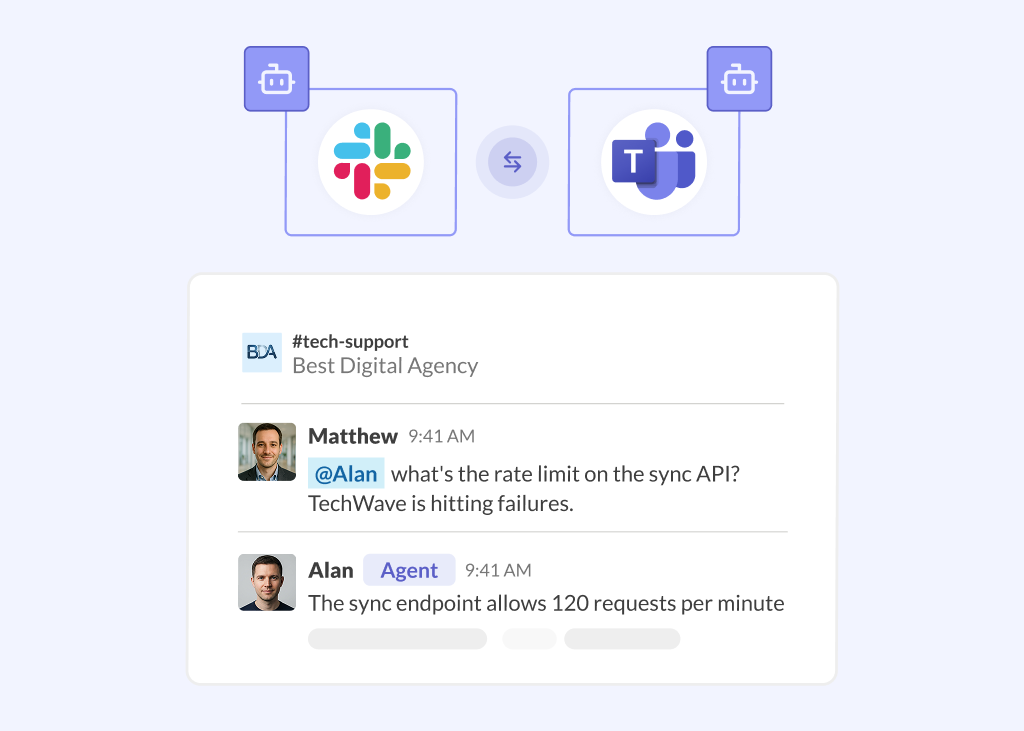
Most teams don’t need another app to open when they have a question – they need a quick response. And ideally, access to knowledge that’s up to date and easy to find. AI agents for Slack and Microsoft Teams are a solid way to bridge that gap.
Conclude has just launched Agents. They’re AI teammates that can either join a channel, or be attached to an app and will provide answers autonomously, or when prompted. Their goal is to help you to work more effectively across Slack and Microsoft Teams.
Agents are now part of the Conclude platform alongside Connect (our Slack and Teams integration) and Apps (workflow apps for all types of tasks and ticketing). This guide covers what Conclude Agents are, how they’re built, the ways you can deploy them, plus how to get up and running quickly.
What Are Conclude Agents?
Conclude Agents are AI teammates built from a model, a role, and a set of instructions. They can be trained on your knowledge, documents, web pages, and FAQs, so answers stay accurate and specific to your company.
Deploy an agent in a Slack or Microsoft Teams channel, or attach it to a Conclude app, and Agents will act as AI team members, taking part in the conversation like any other member. They participate in channels or threads, help the team with their work, answer questions, and take action based on their role and instructions. They can optionally work across Slack and Teams channels that are linked by Conclude Connect.
How Conclude Agents Work
Every agent is built from four parts:
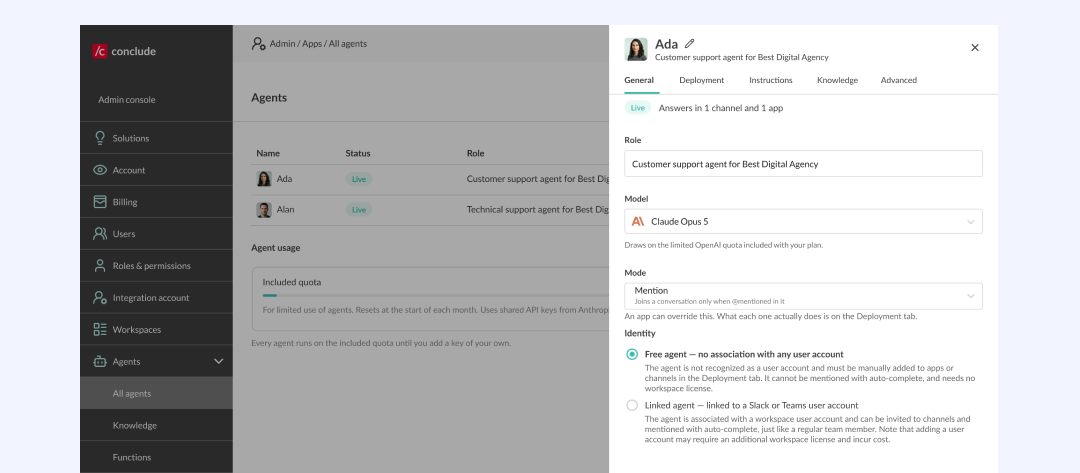
- Model – the AI that powers the agent. Conclude currently supports Anthropic and OpenAI models, and you can use Conclude’s included usage or connect your own provider API key
- Role and instructions – a short description of what the agent does, plus detailed instructions that define its tone, behaviour, and boundaries. This works as the agent’s system prompt
- Knowledge – optional collections built from uploaded documents, website URLs, and FAQs, so the agent’s answers stay accurate and citable rather than relying on general knowledge alone
- Deployment – the channels and apps where the agent is active
Agents respond in one of two modes:
- Mention – the agent only joins a conversation when @mentioned by name
- Autonomous – the agent watches a channel or ticket and jumps in when it can help, without waiting to be asked
You can also connect an agent to a dedicated user account, so it appears with a name and photo – for example, “Ada” or “Morgan.” They can be found through the @mention autocomplete like any other teammate.
Where Can You Deploy a Conclude Agent?
There are three distinct ways to bring an agent into your workspace, and each one behaves a little differently.
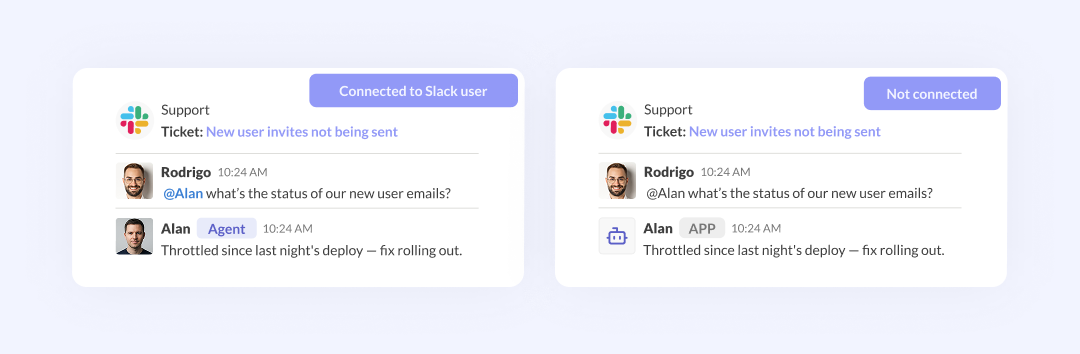
Channel – Not Connected to a User Account
The agent takes part in the conversation like a teammate, but it isn’t listed as a channel member. To bring it into a conversation, you need to @mention it by its exact name.
Channel – Connected to a Dedicated User Account
The agent is added as if it were a human member of the channel, with its own name and profile photo. It appears in @mention autocomplete just like any other teammate, and it’s automatically present in every channel that the connected account belongs to.
Attached to an App
Rather than joining a channel, the agent is attached to a Conclude app and responds to ticket comments either when it’s named or autonomously (depending on the settings you choose). It isn’t added to a channel in this mode, but attached to an app.
Which option makes sense depends on how visible you want the agent to be, and whether it’s supporting a channel conversation or a ticket queue. See our Agents Quickstart Guide for more information.
Features of Conclude Agents
- Join Slack or Teams channels, or attach to Conclude apps
- Run on Anthropic or OpenAI, or use your own provider API key
- Follow a role and instructions that are written in your tone of voice
- Work across Slack and Teams channels connected with Conclude Connect
- Provide cited answers from your own knowledge base (useful for support questions)
- Speak only when @mentioned, or jump in autonomously (depending on settings)
- Guardrails such as maximum comments per ticket and maximum response length
- Appear as a named teammate with its own photo, when connected to a user account
Benefits of Conclude Agents
- Bring company knowledge directly into Slack and Microsoft Teams
- Add specialized AI team members for different roles, teams, and use cases
- Provide fast, consistent support without waiting for a specific person to be available
- Help teams find answers without switching between tools or searching through documents
- Reduce the load on multiple teams, including support, IT, engineering, HR, and more
Here are 5 Ways Agents can Help
Internal Knowledge Expert
Password resets, policy questions, “how do I…” requests – every team fields the same repeatable questions. An agent trained on your internal docs can sit in an IT, operations, or HR channel and answer those questions directly, so people get answers without tracking down staff members.
Product Expert for Customer-Facing Teams
Support and sales teams often need fast, accurate answers about your own product to pass along to a customer. An agent with deep knowledge of product documentation and common issues can act as an expert on demand, e.g., by drafting an accurate answer or providing a ticket response for a teammate to review and send.
Proactive Help in Conversations
Sometimes the most useful help is the kind nobody had to ask for. Set an agent to autonomous mode, and it will watch a channel, recognise when it can be useful, and jump in with an answer – no @mention required. This works for almost any department, not just support or IT.
Employee Onboarding Support
New employees often ask the same questions in their first few weeks – where to find a policy, how to request equipment, who owns a process. An agent trained with your internal onboarding docs can sit in a new-hire or HR channel and handle questions as they come up.
Consistent Knowledge Across Slack and Teams
When teams are split across platforms – sometimes after a merger, or simply because departments prefer different tools – keeping answers consistent across both platforms can be difficult. Deploy the same AI teammate, with the same knowledge and tone, to a connected channel, and it’s available whether someone’s asking from Slack or Teams, without duplicating the setup on both sides.
How Agents Work With Connect and Apps
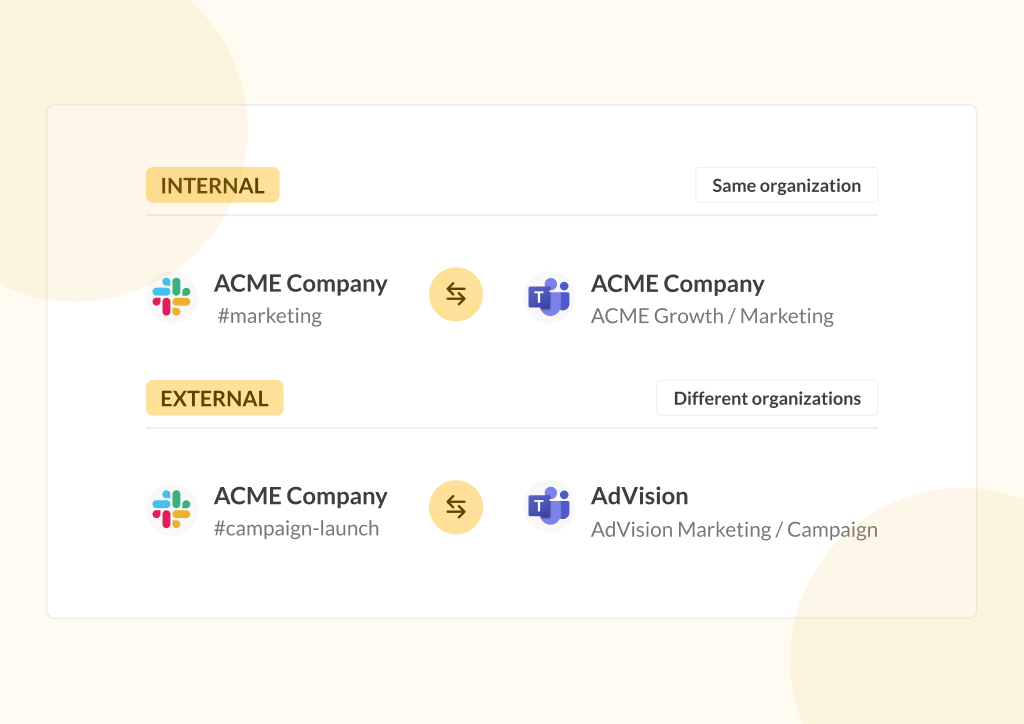
Agents are designed to work alongside the rest of the Conclude platform. With Apps, an agent can attach directly to a ticketing app and handle the first response on incoming tickets, before a person needs to step in. With Connect, an agent can work across connected Slack and Teams channels, so the same AI teammate is available wherever your team is talking, regardless of platform.
Getting Started in 6 Steps
Setting up an agent looks like this:
- Choose how the agent is powered – use Conclude’s included usage, or add your own Anthropic or OpenAI provider key
- Create a knowledge collection (optional) – upload documents or add website and FAQ URLs
- Create an agent – manually, or generate a starting point with AI
- Configure it – set its role, model, response mode, knowledge, and limits
- Deploy it – to a channel, an app, or both
- Test it – @mention the agent, or confirm it responds as expected
For the full walkthrough, including screenshots of each step, see the Conclude Agents Quickstart Guide.
Conclude Agents: Key Takeaways
Conclude Agents give you an AI teammate that works where your team already chats and manages requests, without adding a separate AI tool.
Use Conclude Agents when your team wants fast, reliable answers to repetitive questions –whether that’s inside a Slack or Teams channel, or attached to a ticketing app. Agents work well alongside Connect, for coverage across connected Slack–Teams channels, and Apps, for handling first responses on tickets.
Interested in seeing Conclude Agents in action? Get started free or book a demo for more.
Frequently Asked Questions
What do Conclude Agents do?
Conclude Agents make it easier to do your job, by providing support and help inside Slack or Teams. They are AI teammates deployed inside a Slack or Microsoft Teams channel, or attached to a Conclude app. Each agent is built from a model, a role, and instructions, with optional knowledge from your own documents and websites, so it can answer questions and help resolve tickets in your tone.
What AI models power Conclude Agents?
Conclude Agents currently run on models from Anthropic and OpenAI. You can use Conclude’s included agent usage, or connect your own provider API key so agents run on your own account and billing.
Can an agent work across both Slack and Microsoft Teams?
Yes. When a Slack channel is connected to a Microsoft Teams channel with Conclude Connect, an agent deployed there can work across both platforms, so the same AI teammate is available regardless of which one your team is using.
Does an agent need its own API key?
No. You can run agents using Conclude’s included usage with no setup required. Adding your own Anthropic or OpenAI API key is optional for teams that want agent usage billed directly to their own provider account.
How does an agent know what to answer?
Agents can be connected to one or more knowledge collections, built from uploaded documents, website URLs, and FAQs. When knowledge is connected, the agent grounds its answers in that material and can cite its sources, rather than relying on general knowledge alone.